WordPress host: a tutorial
This tutorial puts the shop demo into a WordPress site. It is written for a platform that is already in charge: it owns the data, the users and the login, and the droplets have to fit into it. Nothing in WordPress changes but one plugin.
All the code is in the repository: the site in examples/hosts/wordpress
(the plugin plugin/droplets-embed, the site build site/init.sh and
site/import.php), the droplets server in examples/wp-shop.
1. The starting point
Section titled “1. The starting point”examples/shop is one droplets server with the shop’s droplets: a gallery
with a filter, product pages with comments, a cart, toasts, a login and an
admin. It keeps everything in its own SQLite, and every
known host embeds it as it is.
A WordPress site that already runs a shop does not hand its data to a second server. So, against the plain shop:
- the data comes from WordPress: the products are posts with meta, the pictures are in the Media Library, the reviews are WordPress comments, all read over the REST API;
- the login is WordPress’s: the admin is whoever is logged in to WordPress; the droplets server has no login of its own;
- the droplets server keeps only what WordPress does not: the carts;
- prerendering happens at container start, since it reads WordPress;
- WordPress gets a plugin with shortcodes, and nothing else changes.
That droplets server is examples/wp-shop: a copy of the shop’s droplets it
needs (not a shared package, so it reads on its own), in the same
frameworks, with the data layer swapped for WordPress’s REST API.
examples/shop stays as it was, on SQLite, for the other hosts.
| Droplet | Framework | Its data |
|---|---|---|
product-filter |
Hono JSX | the categories, counted over the products; hydrates on the first interaction |
product-library, product-card |
Svelte | the products, their meta, their featured images |
product-page |
Handlebars | a product and its related products; prerendered, never hydrated, stock and price filled in per request |
product-comments |
Solid | the product post’s approved comments; the full oldest-first pages prerendered, hydrated when visible |
shopping-cart |
React | wp-shop’s SQLite, checked against WordPress’s stock and prices; rendered in the browser |
toast-center |
Solid | none; rendered in the browser |
product-admin |
Vue | stock and prices, for the WordPress admin |
There is no login droplet: the login is WordPress’s
(step 4).
2. A plugin that brings in the droplets
Section titled “2. A plugin that brings in the droplets”The plugin is plugin/droplets-embed, one folder copied into
wp-content/plugins (the host’s Dockerfile does it):
| File | What it does |
|---|---|
droplets-embed.php |
the plugin header, the [droplet] shortcode, and the shop’s files below |
shop.php |
the [shop_droplet] and [shop_product] shortcodes, the fragment fetches, the proxy, /product/<slug> |
shop-catalogue.php |
the product post type and its meta (step 3) |
shop-identity.php |
the WordPress login, signed for wp-shop, and wp-shop’s writes checked (step 4) |
shop-admin.php |
the Shop screen in wp-admin (step 4) |
shop.css, shop-admin.css |
the theme around the fragments, and wp-admin’s styles set back on the Shop screen |
The smallest shortcode
Section titled “The smallest shortcode”[droplet] is the whole pattern in one function: fetch the fragment on the
server, return it unescaped, enqueue /index.js once. Every attribute
other than id is a prop.
function droplets_shortcode(array|string $atts): string{    $atts = is_array($atts) ? $atts : [];    $id = isset($atts['id']) ? sanitize_key((string) $atts['id']) : '';    if ($id === '') {        return '<p class="error">[droplet] needs an id attribute</p>';    }    unset($atts['id']);
    $url = droplets_internal_url() . '/droplets/' . rawurlencode($id);    if ($atts !== []) {        $url .= '?' . http_build_query($atts);    }
    $response = wp_remote_get($url, [        'timeout' => 5,        'redirection' => 0,        'headers' => ['accept' => 'text/html', 'x-droplet-location' => droplets_public_url()],    ]);    // a WP_Error, or anything but a text/html 2xx or 500: an error paragraph instead
    droplets_enqueue_client();                 // /index.js, once, as a module    return wp_remote_retrieve_body($response); // trusted markup; must not be escaped}add_shortcode('droplet', 'droplets_shortcode');
droplets_enqueue_client() adds /index.js with
wp_enqueue_script_module, once per page (WordPress 6.5 or later, the
plugin’s minimum). The addresses come from
DROPLETS_INTERNAL_URL and DROPLETS_PUBLIC_URL in the environment: the
official Docker image exposes container variables to PHP; behind php-fpm,
define them in wp-config.php instead.
The site’s front page uses it for the Svelte example’s three droplets, one
per mode, from the droplets service (examples/frameworks/svelte):
[droplet id="client" who="WordPress"][droplet id="ssr-hydrate" who="WordPress"][droplet id="ssr-nohydrate" who="WordPress"]That page loads /index.js from the droplets server’s own public URL
(DROPLETS_PUBLIC_URL), so that server runs with cors: true and lists
that URL, and the site’s own origin, in DROPLETS_TRUSTED_ORIGINS: the
x-droplet-location the shortcode sends is not the address WordPress
reaches it at. Only a
text/html answer is pasted (a 2xx, or a 500 carrying the droplet’s error
page), a redirect is never followed, and the shortcode passes no cookie on. The shop’s droplets come from
the site’s own origin instead, through the plugin’s proxy.
The shop’s shortcodes
Section titled “The shop’s shortcodes”[shop_droplet id="product-library" query="*"][shop_droplet id="shopping-cart" variant="inline"][shop_product][shop_droplet] takes the droplet’s id, query (the page’s query keys to
pass on, comma-separated, * for all of them) and any other attribute as a
fixed prop. [shop_product] is the product page of /product/<slug>: the
breadcrumbs, the product-page droplet (props slug, and v when the
link has one) and its product-comments (order, page and showing
from the page’s query, plus productId). /product/<slug> is a rewrite
rule to the Product page, with the slug as the shop_product query
variable; the product’s id and category come from the product page’s
public _data read. Without a slug the page redirects to /gallery; an
unknown slug answers 404 with a “Not found” notice.
Fetching the fragments, all at once
Section titled “Fetching the fragments, all at once”On template_redirect (priority 20), before the theme renders and while
headers can still be sent, the plugin finds the shop shortcodes in the page
and in the header and footer template parts and fetches all their fragments
at once with Requests::request_multiple:
// shop.php, droplets_shop_fragments()$origin = droplets_shop_public_origin();$headers = [ 'accept' => 'text/html', 'x-droplet-location' => $origin, 'referer' => $origin . (string) ($_SERVER['REQUEST_URI'] ?? '/'),];$cookie = droplets_shop_cookie_header(); // cart_id only, never WordPress's login cookiesif ($cookie !== null) { $headers['cookie'] = $cookie;}foreach ($wanted as $key => [$id, $pairs]) { $query = droplets_shop_build_query($pairs); $path = '/droplets/' . rawurlencode($id) . ($query === '' ? '' : '?' . $query); $assertion = droplets_shop_user_assertion('GET', $path); // null unless an admin is logged in $requests[$key] = [ 'url' => droplets_shop_internal_url() . $path, 'headers' => $assertion === null ? $headers : $headers + [DROPLETS_SHOP_USER_HEADER => $assertion], 'type' => 'GET', 'options' => ['follow_redirects' => false, 'timeout' => 5], ];}$responses = WpOrg\Requests\Requests::request_multiple($requests);x-droplet-locationis this site’s origin, fromSHOP_PUBLIC_URL, never the client’sHost.refereris the page’s URL, path and query: wp-shop’shandlemakes it the droplet’shost(below).- No redirect is followed, and each fetch times out after 5 seconds.
- Only
text/htmlanswers are pasted (a 2xx, or a 500 with the droplet’s error); anything else becomes a short notice. - Their
Set-Cookiegoes back to the browser untouched, theirLinkpreloads on this origin go into the head, and a redirect is passed on. - The page gets
Cache-Control: private, no-store, and/index.jsis enqueued once as a script module, through the proxy.
On every shop page the plugin fetches the toast-center droplet with the
others and prints it first in the body, before the theme’s header, once
(wp_body_open). The plugin also enqueues its shop.css on every
front-end page. The toasts listen on window.shopMessageQueue, which
/index.js installs before any droplet starts (the shop’s
src/hooks.client.ts).
Each shortcode leaves a placeholder, filled with its fragment when the output buffer ends:
function droplets_shop_fill(string $html): string{ return strtr($html, droplets_shop_state()['slots']);}A block theme runs the whole template through wptexturize, smilies and
the image filters after the shortcodes; a fragment that went through them
would no longer match what the droplet hydrates.
The proxy
Section titled “The proxy”droplets_shop_proxy() runs on init at priority 0, before WordPress
routes anything, and passes /index.js, /env.js, /index.css, /droplets/* (fragments, _data,
form actions), /assets/* and /api/* to wp-shop (SHOP_INTERNAL_URL):
$path = (string) strtok($request_uri, '?');if (preg_match('#^/(?:index\.js$|env\.js$|index\.css$|droplets/|assets/|api/)#', $path)) { if (droplets_shop_has_dot_segment($path)) { status_header(400); // … 'Bad request.' exit; } droplets_shop_proxy($request_uri);}It refuses a path with a . or .. segment once decoded, writes
x-droplet-location out, forwards a short list of request headers and, of
the cookies, only cart_id; it never passes on an x-wp-shop-user the
browser sends, and adds its own for a logged-in admin on /droplets/* and
/api/* (step 4). The path is appended to
SHOP_INTERNAL_URL as it came, never resolved, so //elsewhere stays a
path on wp-shop. It follows no redirect, waits 15 seconds at most, drops
the hop-by-hop headers and sends the rest of the answer back, Set-Cookie
and redirects untouched; when wp-shop does not answer, it is 502 The shop is unreachable. wp-shop’s cookie is the site’s own, and nothing is
cross-origin.
PHP leaves php://input empty for multipart posts, so the proxy writes a
multipart post (the admin’s image upload) out again from $_POST and
$_FILES.
The pages
Section titled “The pages”wordpress-init runs site/init.sh with WP-CLI on every start. On an
empty database (wp core is-installed fails) it builds the site: WordPress
with the stock Twenty Twenty-Five theme and the demo login admin /
droplets, the catalog (step 3), then
ordinary pages with the shortcodes in wp:shortcode blocks:
| Page | Template | Content |
|---|---|---|
Gallery, /gallery |
Page No Title | a hero, [shop_droplet id="product-filter" query="*"], [shop_droplet id="product-library" query="*"] |
Product, /product/<slug> |
Page No Title | [shop_product]: breadcrumbs, the product page, its comments |
Cart, /cart |
Page | [shop_droplet id="shopping-cart" variant="inline"] |
page() {  id=$(wpa post create "/site/pages/$3" --post_type=page --post_status=publish --post_name="$1" --post_title="$2" --porcelain)  if [ -n "${4:-}" ]; then wpa post meta set "$id" _wp_page_template "$4" >/dev/null; fi  echo "$id"}
gallery=$(page gallery "Gallery" gallery.html page-no-title)page product "Product" product.html page-no-title >/dev/nullcart=$(page cart "Cart" cart.html)
It adds About, a Journal with two posts and a “Primary” menu, and saves the
header and footer template parts the way the Site Editor does
(site/parts/): the header holds the cart badge,
[shop_droplet id="shopping-cart" variant="badge"]. The front page is the
[droplet] page above. There is no login page and no admin page: the
admin is a wp-admin screen (step 4).
Comments need no name or email, and are not held for a previous approval.
Three things WordPress would get in the way of:
?page=Nis WordPress’s too: it reads it as a page of a paginated post, and would 404 or redirect. On a page with a shop shortcode the plugin drops it from the query (therequestfilter) and turns off the canonical redirect; the shop still reads it from the query string.- No trailing slash: the permalinks are
/%postname%, so the shop’s own links (/gallery,/product/<slug>) are the pages’ URLs. - The proxy needs the plugin active, which
wordpress-initdoes last, about a minute after the first start; every run activates it and flushes the rewrite rules again, so/product/<slug>resolves.
3. WordPress owns the data
Section titled “3. WordPress owns the data”A mature platform keeps its own data: its editors already work in wp-admin, its comments already have moderation. So the catalog moves into WordPress, and the droplets server reads it back.
The catalog: a post type and its meta
Section titled “The catalog: a post type and its meta”shop-catalogue.php registers the product post type with show_in_rest
at wp/v2/products. The title is the product’s name, the content its
description, the featured image its picture, comments are on. It is not
public: /product/<slug> stays the Product page with the shop’s fragments.
register_post_type('product', [ 'public' => false, 'show_ui' => true, 'show_in_rest' => true, 'rest_base' => 'products', 'supports' => ['title', 'editor', 'thumbnail', 'comments', 'custom-fields'], 'rewrite' => false,]);| Meta | Type | Meaning |
|---|---|---|
shop_price_cents |
integer, 1 to 10 000 000 | the list price |
shop_stock |
integer, 0 to 99 999 | units left |
shop_sale_pct |
integer, 0 to 90 | the campaign’s discount on it, 0 for none |
shop_category |
mugs | desk | bags | home |
its category (wp-shop’s src/lib/categories.ts names them) |
shop_details |
string, at most 300 | 300 ml · Stoneware · … |
Each is registered with register_post_meta, show_in_rest with that
schema, and an auth_callback of edit_post: anyone may read them, only an
editor of the post may write them. wp-admin’s product screen (the classic
editor) has a “Shop” meta box for the same fields, and the list shows
price and stock.
The reviews are the product posts’ own comments. wp-shop posts a visitor’s
comment to wp/v2/comments anonymously, which the plugin allows on
products only; WordPress’s moderation, flood and duplicate checks apply:
add_filter('rest_allow_anonymous_comments', static function (bool $allowed, WP_REST_Request $request): bool { return $allowed || get_post_type((int) $request->get_param('post')) === 'product';}, 10, 2);The import
Section titled “The import”init.sh imports the demo data once with wp --user=admin eval-file /site/import.php,
before it activates the plugin: examples/shop’s generated mock data (20
products, their images, 278 comments) as product posts with meta (a 20
percent sale on every fourth product), Media Library attachments set as
featured images, and approved comments with their dates. It does nothing
when products are there already.
$id = wp_insert_post([ 'post_type' => 'product', 'post_status' => 'publish', 'post_name' => $slug, 'post_title' => (string) $product['name'], 'post_content' => (string) $product['description'], // …], true);update_post_meta($id, 'shop_price_cents', (int) $product['priceCents']);// … shop_stock, shop_sale_pct, shop_category, shop_details$media = media_handle_sideload(['name' => "{$slug}.webp", 'tmp_name' => $tmp], $id, (string) $product['name']);set_post_thumbnail($id, $media);// then wp_insert_comment() for each of its comments, approved, dated as seededwp-shop reads it over REST
Section titled “wp-shop reads it over REST”src/lib/server/wp.ts is wp-shop’s whole data layer. It reads
GET /wp-json/wp/v2/products?per_page=100&page=…&orderby=date&order=desc&_fields=id,slug,status,date_gmt,title,content,featured_media,meta, page after page asX-WP-TotalPagessays, ten pages at most;GET /wp-json/wp/v2/media?include=…&per_page=100&_fields=id,source_urlfor the featured images;GET /wp-json/wp/v2/comments?post=…&orderby=date_gmt&order=asc|desc&per_page=…&page=…&_fields=id,post,author_name,date_gmt,content,status, and the count fromX-WP-Total;
and writes POST /wp-json/wp/v2/products/<id> (stock and price,
step 4) and POST /wp-json/wp/v2/comments (a
visitor’s comment).
Every answer is untrusted input, as a request body would be:
- only paths under
/wp-json/are called, no redirect is followed, a request times out after 5 seconds, and only a JSON answer of at most 2 MB is read (Content-Length, then counted as it streams); - plain
JSON.parse, then every item through a schema that names each field it keeps, with its type, range and length; the schema builds a new object of those fields only, so nothing else of the answer (a__proto__key included) reaches wp-shop’s objects; - an item out of shape is left out and logged, never repaired; an answer that is not a list where one is due, or an error, throws and the droplet shows its error;
title.renderedandcontent.renderedbecome text (tags dropped, entities decoded), which the templates escape again; the HTML is never pasted;- an image counts only as a Media Library URL on WordPress’s public origin
(
WP_PUBLIC_URL, under/wp-content/uploads/, a.webp,.pngor.jpg, without credentials, query or hash).
export const wpProduct = z.object({ id: postId, slug: z.string().check(z.maxLength(80), z.regex(SLUG)), status: z.literal("publish"), date_gmt: gmt, title: rendered(400), content: rendered(20_000), featured_media: whole(0, 9_999_999_999), meta: z.object({ shop_price_cents: whole(1, 10_000_000), shop_stock: whole(0, 99_999), shop_sale_pct: whole(0, 90), shop_category: z.enum(CATEGORY_SLUGS), shop_details: z.string().check(z.maxLength(400)), }),});One WordPress page fetches several fragments at once, each wanting the
catalog: they share one read, kept a second (src/lib/server/site.ts).
A write through wp-shop forgets it at once; an edit in wp-admin shows
within that second.
Only the carts stay
Section titled “Only the carts stay”The carts are wp-shop’s own SQLite (WP_SHOP_DATABASE, default
wp-shop.db), their lines naming products by id (p_<post id>), checked
against WordPress’s stock and prices.
4. The login is WordPress’s
Section titled “4. The login is WordPress’s”There is one login, WordPress’s. The admin is whoever is logged in to
WordPress and can manage_options; wp-shop has no login of its own and
holds no WordPress password. Two signed headers carry that across, one per
direction, each with its own secret.
The assertion to wp-shop
Section titled “The assertion to wp-shop”When a logged-in user who can manage_options causes a request to wp-shop
(a fragment the plugin fetches, or a proxied /droplets/* or /api/*
request: an action, a _data read), the plugin adds
x-wp-shop-user: base64url({sub, role, exp, method, path, aud}).base64url(HMAC-SHA256)function droplets_shop_user_assertion(string $method, string $path): ?string{ $secret = droplets_shop_host_secret(); if ($secret === null || !is_user_logged_in() || !current_user_can('manage_options')) { return null; } $method = strtoupper($method); if (!in_array($method, ['GET', 'HEAD'], true) && droplets_shop_request_header('origin') !== droplets_shop_public_origin()) { return null; } $claims = [ 'sub' => wp_get_current_user()->user_login, 'role' => 'administrator', 'exp' => time() + DROPLETS_SHOP_ASSERTION_SECONDS, 'method' => $method, 'path' => $path, 'aud' => 'wp-shop', ]; $payload = droplets_shop_b64url((string) wp_json_encode($claims, JSON_UNESCAPED_SLASHES)); return $payload . '.' . droplets_shop_b64url(hash_hmac('sha256', $payload, $secret, true));}- It is keyed with
WP_SHOP_HOST_SECRET(32+ bytes, the same on both sides), which is for this direction only. wp-shop’s writes back are keyed withWP_SHOP_SERVICE_SECRET, and both sides refuse the two when they are the same value: no admin, no writes, and the log says why. subis the user’s login,roleadministrator,expat most 60 seconds out,methodandpaththe request it is for (the path and query on wp-shop),aud: "wp-shop".- The proxy never passes the browser’s
x-wp-shop-useron (it forwards a short list of headers), nor WordPress’s login cookies (onlycart_id). - An unsafe method gets one only when the browser’s
Originis the site’s own; wp-shop’sOrigincheck refuses the rest anyway.
wp-shop’s handle checks it into locals.admin, in this order: at most
1 KB and the shape; the MAC with crypto.subtle.verify, before anything is decoded;
plain JSON.parse; own keys copied into an object without a prototype
(Object.hasOwn), each checked for its type; then exp, the method, the
path and aud. Anything else is no admin, and so is everything when the
secret is missing or short. The checks are hostAdmin in
src/lib/server/admin.ts and verifyAssertion in
src/lib/server/host-identity.ts.
export const handle: Handle = async ({ event, resolve }) => {  event.locals.admin = building ? null : await hostAdmin(event.request, event.url);  event.locals.cartId = building ? null : cartIdFrom(event.cookies.get(CART_COOKIE));
  // WordPress sends its page's URL as Referer: `host` gets the path, so a  // relative redirect after an action lands where it should.  event.locals.page = building ? null : pageFrom(event);  event.host = event.locals.page ?? event.host;
  const response = await resolve(event);  if (event.locals.admin || PRIVATE_API.test(event.url.pathname)) response.headers.set("cache-control", "private, no-store");  return response;};
The same handle makes the Referer the plugin sends the droplet’s
host, and keeps it as locals.page. pageFrom reads it with
hostFrom, which takes a web URL within
trustedOrigins (here DROPLETS_TRUSTED_ORIGINS, the site’s origin); with
no list set, pageFrom keeps only wp-shop’s own pages. Anything else keeps
the default host, and locals.page is null. An answer to an admin, and every
/api/cart* and /api/auth* answer, is private, no-store.
The Shop screen in wp-admin
Section titled “The Shop screen in wp-admin”The product-admin droplet (stock and prices) is a top-level wp-admin
page, Shop (admin.php?page=droplets-shop), for users who can
manage_options (shop-admin.php); anyone else gets 403. On
load-<hook>, before wp-admin prints anything, the plugin fetches the
fragment the way the public pages do: the admin’s assertion for that one
GET, the screen’s URL as Referer, the fixed x-droplet-location. The
menu page’s callback prints it, and its Link preloads go into
admin_head. /index.js and the screen’s stylesheet are enqueued on that
screen only:
add_action('admin_enqueue_scripts', static function (string $hook_suffix): void { if ($GLOBALS['droplets_shop_admin_hook'] === '' || $hook_suffix !== $GLOBALS['droplets_shop_admin_hook']) { return; } wp_enqueue_style('droplets-shop-admin', plugins_url('shop-admin.css', __FILE__), [], '1'); wp_enqueue_script_module('droplets-shop', '/index.js', [], null);});The droplet’s saves post to /droplets/product-admin?/save through the
proxy, which signs them as it does everywhere: that method and path,
aud: "wp-shop", and only with this site’s Origin. The droplet’s own
CSS is scoped to <djs-shop>, so nothing of it reaches the rest of
wp-admin. The other way round, wp-admin styles a few things the droplet
uses as well (.wp-core-ui .button, .notice, .row-actions, p, b,
inputs), some more specifically than the droplet’s scoped rules;
shop-admin.css, all under the screen’s #droplets-shop-admin, sets those
back.
No public page has it: [shop_droplet id="product-admin"] renders a
notice instead, and /admin, which no page answers, redirects (302) to
the Shop screen, which sends a visitor to wp-login.php. The plugin does
that redirect on template_redirect at priority 1, before WordPress’s own guess
(wp_redirect_admin_locations, the dashboard); /login is WordPress’s own
redirect to wp-login.php. None of the public droplets (gallery, cart,
toasts) are in wp-admin.
Rendered without an admin anyway (put on a public page, or with a missing
secret), the droplet shows a link to
/wp-login.php?redirect_to=<the page>, the path and query of the page it
renders on (its host),
never a redirect; WordPress logs the visitor in and sends them back, and
the next fragment fetch carries the assertion. Each of its actions checks
again on its own and answers fail(401) without an admin.
Writes back to WordPress
Section titled “Writes back to WordPress”Stock and price can be edited in two places, both as that WordPress
account: in the product’s meta box, or in the admin droplet on the Shop
screen. The droplet’s ?/save writes back to the REST API with
x-wp-shop-service, the same format signed by wp-shop with
WP_SHOP_SERVICE_SECRET for aud: "wordpress", the write’s own method,
path and body (its SHA-256), 60 seconds. The plugin checks it in determine_current_user and runs
the request as that user, if they can still manage_options, but only for
the one write wp-shop makes:
const DROPLETS_SHOP_SERVICE_ROUTES = [ ['POST', '#^/wp-json/wp/v2/products/[1-9][0-9]{0,9}(?:\?_fields=[a-z_,]{1,200})?$#D'],];The method and the whole request URI, anchored: a numeric id, and
_fields the only query parameter, so no rest_route or _method can
send it elsewhere; with a method override header or form fields it does
not count either. On any other route (/wp-json/wp/v2/users, settings,
plugins) the header is ignored and WordPress’s own login applies. Once
WordPress has routed the request, rest_pre_dispatch checks the same list
against the route it found and refuses anything else. WordPress’s
edit_post check and the meta’s schema apply as to any REST write.
Comments go to wp/v2/comments anonymously, without the header.
The filter runs at priority 30: WordPress’s wp_validate_auth_cookie runs
on determine_current_user at 10 and returns false for a request with no
cookie, which would undo an earlier answer.
When this pattern is fine
Section titled “When this pattern is fine”A droplets server with no login of its own can take the visitor’s identity from its host this way only when all of these hold:
- The host is the only way in. The droplets server is on a private network, its port not published; the browser reaches it through the host’s server, which fetches the fragments and proxies the rest.
- The host strips the header. It forwards a short list of request headers, never the assertion’s, and not its own login cookies.
- Each direction has its own secret, 32 bytes or more, from the environment on both sides, and both sides refuse the two when they are equal, so a key that leaks signs one direction only.
- An assertion is bound to one request: the user, the role, an expiry at most a minute out, the method, the path and query, and the audience. A captured one is worth one URL for a minute.
- The host checks unsafe requests too: it signs a form post only when
the browser’s
Originis its own, and the droplets server’sOrigincheck runs as for every form post. - The writes back are an allow-list: one method and route, anchored, so whoever holds that secret can make those writes and nothing more.
Where the droplets server is reachable from the internet, or the host cannot strip headers, give it a login of its own instead, as the shop does. The Security model has the rest.
5. Prerender at container start
Section titled “5. Prerender at container start”The product page is prerendered once per product, under its version v
(entries() returns { props: { slug, v } }), and the full oldest-first comment pages
too, as in the shop. Both read WordPress, which is not running during
docker build. So the image holds the sources and its start script
builds:
node scripts/wait-for-wordpress.mjsnode node_modules/vite/bin/vite.js buildexec node dist/server.jswait-for-wordpress.mjs asks wp/v2/products?per_page=1 every 3 seconds
until it answers 200, JSON, with an X-WP-Total above 0, for 10 minutes
at most (WP_WAIT_MINUTES).
wordpress-init activates the plugin last, after the import: the product
route exists only then, so wp-shop never builds from half a catalog. A
restart builds again from what WordPress has then.
v is a short hash (the first 10 hex characters of a SHA-256) of what the
page’s load returns (name, text, details, image, category, related
products), never of stock or prices. A post’s
modified would do as well, but it moves with every stock edit and the
stored page would be passed over for nothing. An edit in wp-admin to the
title or the text gives a new v: the shop’s links carry it, the page
renders live, and an old link redirects to the page without v, as in
the shop, when the request names a trusted
page (locals.page); without one, the old link renders live.
The template writes placeholders where stock and prices go
(%live:stock-label%, %live:price%, …), and
transform fills them from WordPress on
every request, HTML-escaped, over the stored page and a live one alike:
export const transform = async ({ html, props, locals }: TransformEvent) => {  const slug = String(props["slug"]);  const [live, versions] = await Promise.all([liveValues(slug), pageVersions()]);  if (!live) return `<p class="gone">This product is no longer available. <a href="/gallery">Back to the gallery</a></p>`;
  if (props["v"] !== undefined && props["v"] !== versions.get(slug) && locals.page) {    const canonical = new URL(locals.page);    canonical.searchParams.delete("v");    redirect(302, canonical.href);  }
  return fillVersions(fillLive(html, live), versions);};
locals.page is the WordPress page, from the Referer the plugin sends,
so the redirect goes to the same page without v; any other page gets the
live render. fillVersions gives the
related products’ links their pages’ current v.
Set a product’s stock to 0 in wp-admin and its prerendered page says “Out of stock” within a second (the catalog read is kept that long), its render id unchanged.
6. Run it
Section titled “6. Run it”cd examples/hosts/wordpressdocker compose up --build # no manual stepsdocker compose logs -f wp-shop # wait until it servesopen http://localhost:8008/gallery # wp-admin, Shop: admin / dropletspnpm test:hosts wordpress # from the repository root: the flow in a browserSet WP_SHOP_HOST_SECRET, WP_SHOP_SERVICE_SECRET (two different values) and
DROPLETS_SECRET first (32 or more random bytes each, openssl rand -hex 32),
in the environment or a .env file beside docker-compose.yml: compose refuses
to start without them. pnpm test:hosts wordpress generates its own for a run.
docker compose down -v starts over from an empty site. The compose file
starts five services:
| Service | Port | What it is |
|---|---|---|
wordpress |
8008, on 127.0.0.1 |
wordpress:6-php8.3-apache with the plugin copied in (its Dockerfile): the shop’s pages, the proxy, the REST API, wp-admin, the [droplet] page at / |
wordpress-init |
none | WP-CLI: installs WordPress, imports the catalog, builds the site, activates the plugin, then exits |
db |
internal only | MariaDB for WordPress |
wp-shop |
8310, internal only | the shop’s droplets (examples/wp-shop): waits for WordPress’s REST API, builds, serves; reachable from WordPress only |
droplets |
8000, on 127.0.0.1 |
the Svelte example’s droplets server, for the [droplet] page only |
On wordpress |
Value | Used for |
|---|---|---|
SHOP_INTERNAL_URL |
http://wp-shop:8310 |
internal: fragment fetches and the proxy |
SHOP_PUBLIC_URL |
http://localhost:8008 |
public: this site’s own origin, sent as x-droplet-location |
WP_SHOP_HOST_SECRET |
32+ bytes, the same on wp-shop |
signs x-wp-shop-user for a logged-in admin |
WP_SHOP_SERVICE_SECRET |
32+ bytes, the same on wp-shop, not the host secret |
checks wp-shop’s writes back (x-wp-shop-service), on the product write route only |
DROPLETS_INTERNAL_URL, DROPLETS_PUBLIC_URL |
http://droplets:8000, http://localhost:8000 |
the same pair, for [droplet] |
On wp-shop |
Used for |
|---|---|
WP_INTERNAL_URL |
how wp-shop reaches WordPress: http://wordpress |
WP_PUBLIC_URL |
WordPress’s public origin, http://localhost:8008: images must be on it |
WP_SHOP_HOST_SECRET |
verifies x-wp-shop-user (32+ bytes; the same value on WordPress) |
WP_SHOP_SERVICE_SECRET |
signs x-wp-shop-service, the writes back (32+ bytes; the same value on WordPress; never WP_SHOP_HOST_SECRET’s) |
DROPLETS_TRUSTED_ORIGINS |
http://localhost:8008, the only origin whose x-droplet-location and form posts it accepts |
DROPLETS_SECRET |
signs a form’s result on the redirect back to the page when JavaScript is off (Post/Redirect/Get) |
wp-shop keeps the carts in a SQLite file, wp-shop.db unless
WP_SHOP_DATABASE names another. The compose file takes the secrets from
the environment and refuses to start without them; the WordPress login, admin / droplets, is a demo value.
The shop is up a little after WordPress: wordpress-init waits for the
database, imports, then activates the plugin, about a minute after start;
wp-shop builds once the products route answers.
The tests
Section titled “The tests”pnpm --filter @dropletsjs/example-wp-shop test, part ofpnpm check, runs three groups. The assertion’s negative cases: a tampered payload or MAC, expired, the wrong method, path or audience, oversize,__proto__, no secret, the other direction’s secret, both secrets equal. Malformed WordPress answers: not JSON, not a list, too large, a redirect, items out of shape, images elsewhere. Then wp-shop built and served against a stand-in WordPress.pnpm test:hosts wordpress:e2e/shop-wordpress.spec.ts, the flow in a browser: the gallery, a product page with a comment posted (a WordPress comment, shown at once), the cart; a login at wp-login.php, wp-admin’s Shop screen, a stock set to 0 with no shop login, a logout; then, anonymous, the cart and the product page saying “Out of stock”. Without JavaScript the comment posts once, through the 303 back to the page, and a reload posts nothing again. Its negative cases: the Shop screen logged out (to wp-login.php), as an editor (403, and the proxy signs nothing for them), a save from another origin,/adminand the public pages without the admin droplet, and wp-admin’s styles and the droplet’s kept apart. The sharede2e/shop.spec.tsrenames a product in wp-admin; thene2e/wordpress-service.spec.tssignsx-wp-shop-serviceitself and checks that it counts on the product write only, never on/wp-json/wp/v2/usersor withrest_route,_methodor a method override.
7. The result
Section titled “7. The result”The shop’s interface on WordPress 6, recorded by pnpm test:hosts wordpress: the products are WordPress posts, their reviews WordPress
comments, the admin a WordPress account.
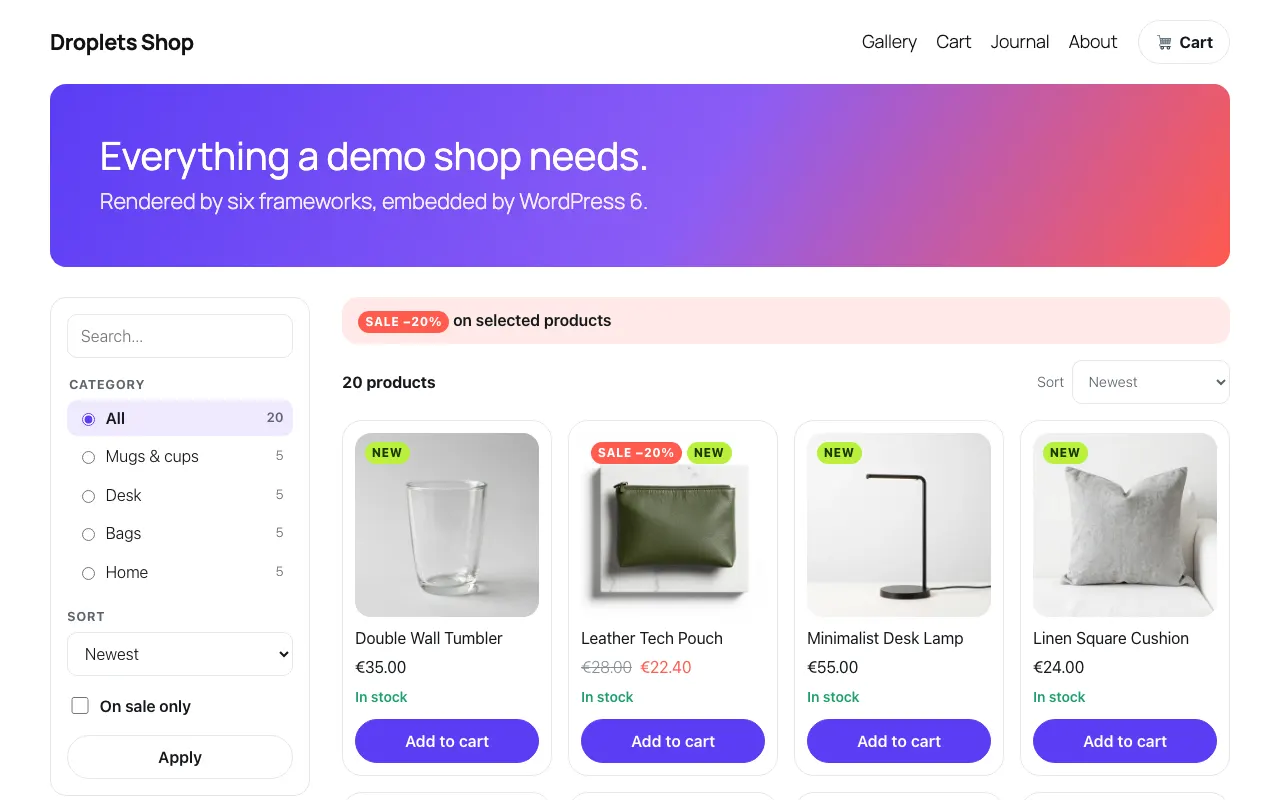 The gallery
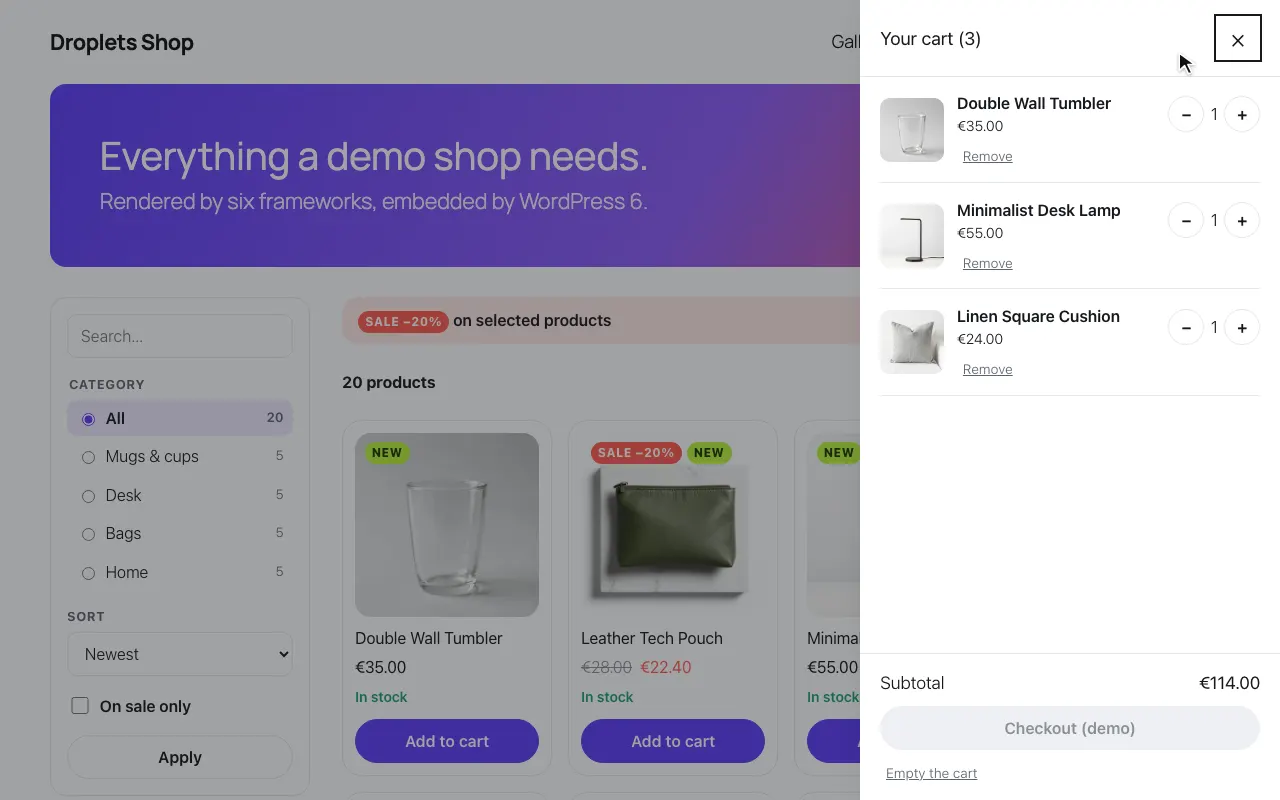 A product in the cart
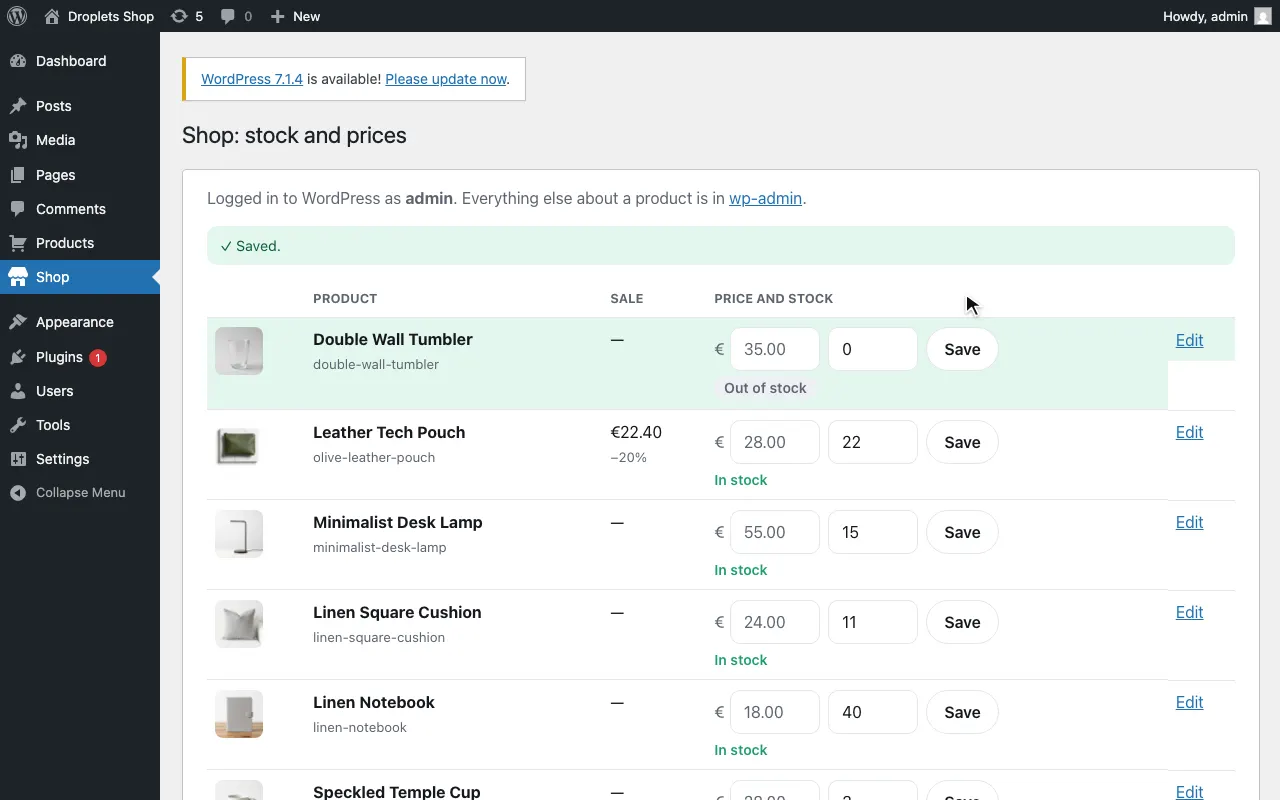 The admin: stock set to 0
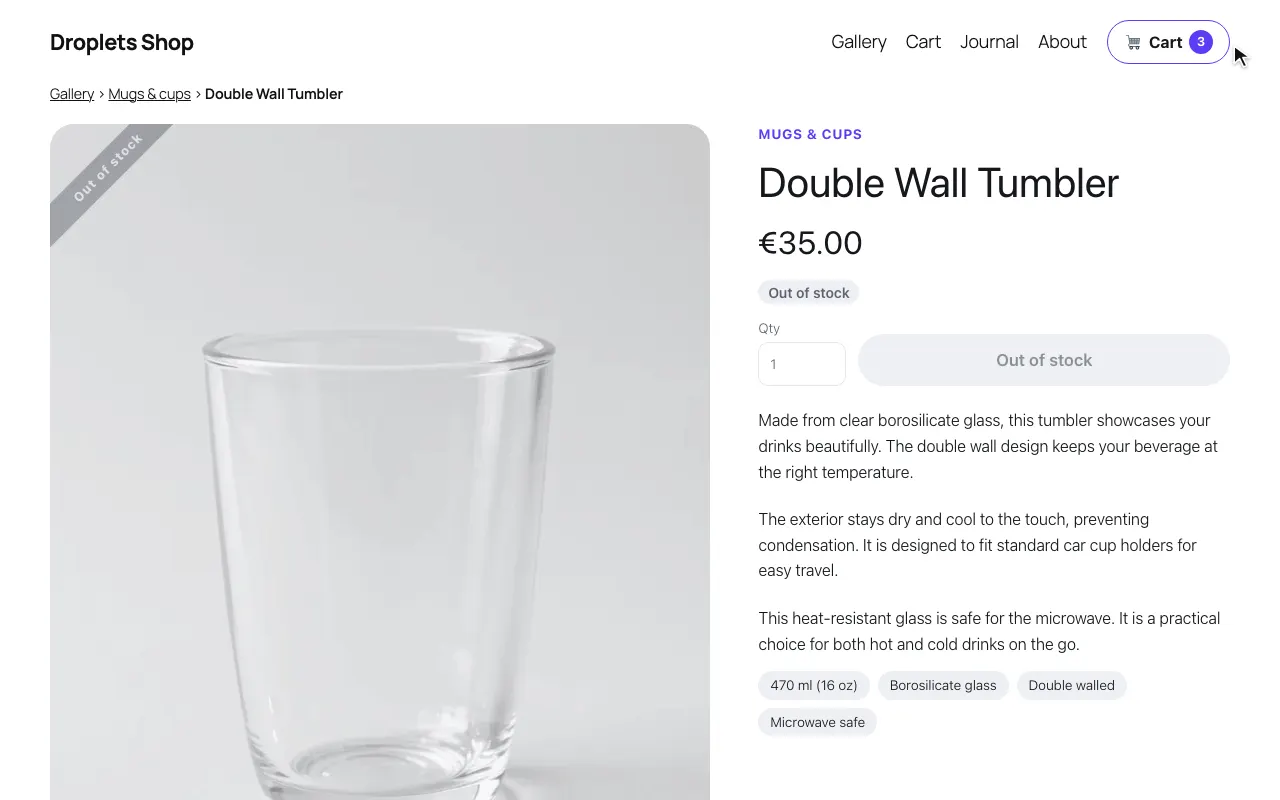 The product page: out of stock