React + Vite
How a React single-page app embeds droplets: a component fetches each fragment from the browser, through a same-origin proxy, and inserts it.
The pattern in React + Vite
Section titled “The pattern in React + Vite”// src/shop/ShopDroplet.tsx (trimmed)export function ensureShopClient(): void { if (document.querySelector('script[src="/index.js"]')) return; const script = document.createElement("script"); script.type = "module"; script.src = "/index.js"; document.head.appendChild(script);}
// ShopFragment: GET /droplets/<id>?<query>, inserted as it came.useEffect(() => { ensureShopClient(); const target = host.current; if (!target) return; fetch(`/droplets/${encodeURIComponent(id)}?${search}`, { redirect: "manual", headers: { accept: "text/html" } }) .then(async (response) => { if (response.type === "opaqueredirect") { if (redirected.current) return redirected.current(); // onRedirect throw new Error("redirected"); } const isFragment = (response.ok || response.status === 500) && (response.headers.get("content-type") ?? "").startsWith("text/html"); if (!isFragment) throw new Error(`HTTP ${response.status}`); const template = document.createElement("template"); template.innerHTML = await response.text(); target.replaceChildren(template.content); // the element upgrades on insert }); return () => target.replaceChildren();}, [id, search]);
// ShopClientDroplet: the element alone; it fetches its own data.const element = document.createElement(SHOP_ELEMENT); // "djs-shop"element.dataset["droplet"] = id;element.dataset["dropletProps"] = paramsKey; // JSON.stringify(params)target.replaceChildren(element);# nginx.conf (trimmed)location ~ ^/(index\.js$|env\.js$|index\.css$|droplets/|assets/|api/) { proxy_pass http://shop:8300; proxy_set_header Cookie $shop_cookie; proxy_set_header x-droplet-location ${SHOP_PUBLIC_URL}; proxy_set_header Forwarded ""; proxy_set_header X-Forwarded-Host ""; proxy_set_header X-Forwarded-Proto ""; proxy_set_header X-Forwarded-Prefix ""; proxy_set_header X-Forwarded-For ""; client_max_body_size 4m;}location / { try_files $uri /index.html;}ShopFragmentfetchesGET /droplets/<id>?<query>from the browser withaccept: text/html. It is a same-origin request, so the browser sends the shop’s cookies and the page’s URL asRefereritself, and nginx addsx-droplet-locationon the way to the shop.redirect: "manual"turns a 3xx into anopaqueredirect, which the page handles (onRedirect).- Only a
text/htmlanswer (a 2xx, or a 500 carrying the droplet’s error page) is inserted, through a<template>; anything else shows as unavailable. ShopClientDropletwrites<djs-shop data-droplet="…" data-droplet-props="…">instead: nothing server-rendered, the element fetches its data once its bundle has loaded.ensureShopClient()adds<script type="module" src="/index.js">to the head once.nginx.confpasses/index.js,/env.js,/index.css,/droplets/*,/assets/*and/api/*to the shop and answers every other path withindex.html; it is a template, and the nginx image fills in${SHOP_PUBLIC_URL}(http://localhost:8004) when it starts.
The shop demo, recorded
Section titled “The shop demo, recorded”The shop demo on React 19 and Vite, recorded by the end-to-end test. How the pieces fit has the diagram.
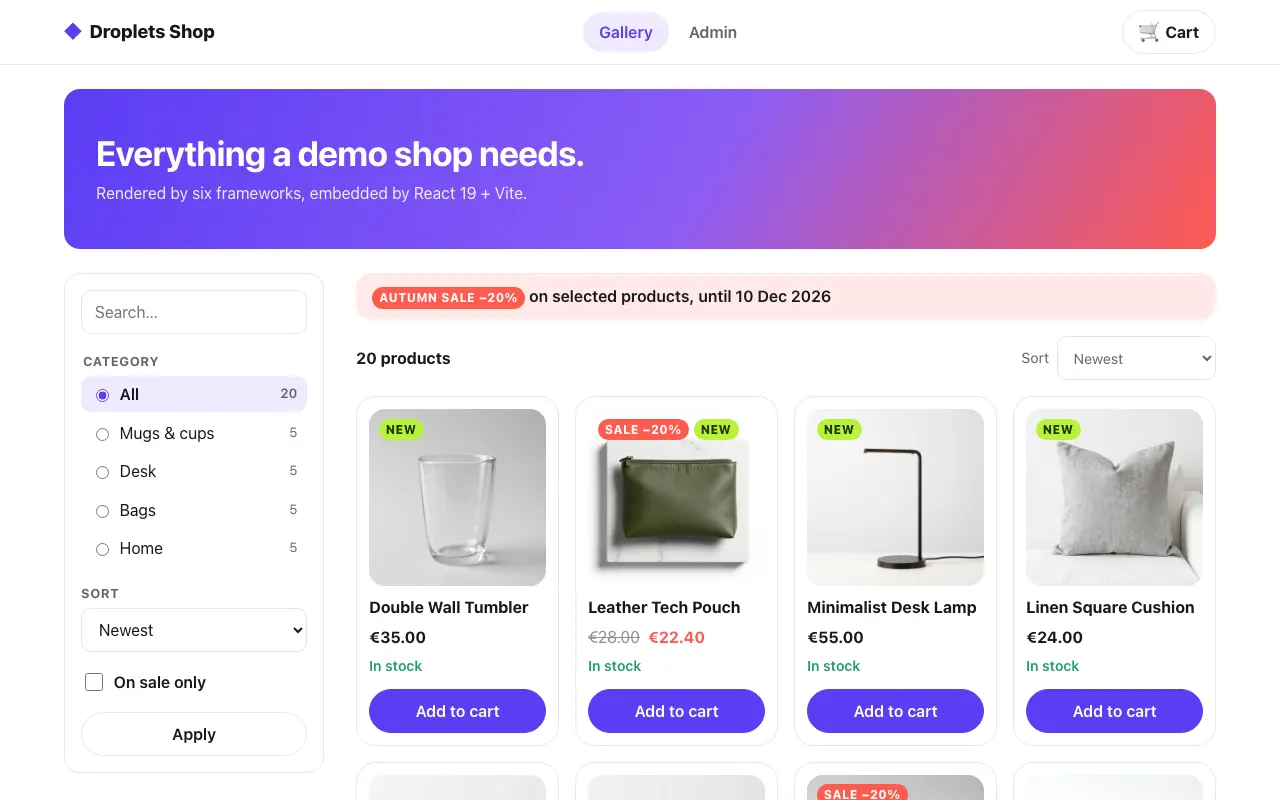 The gallery
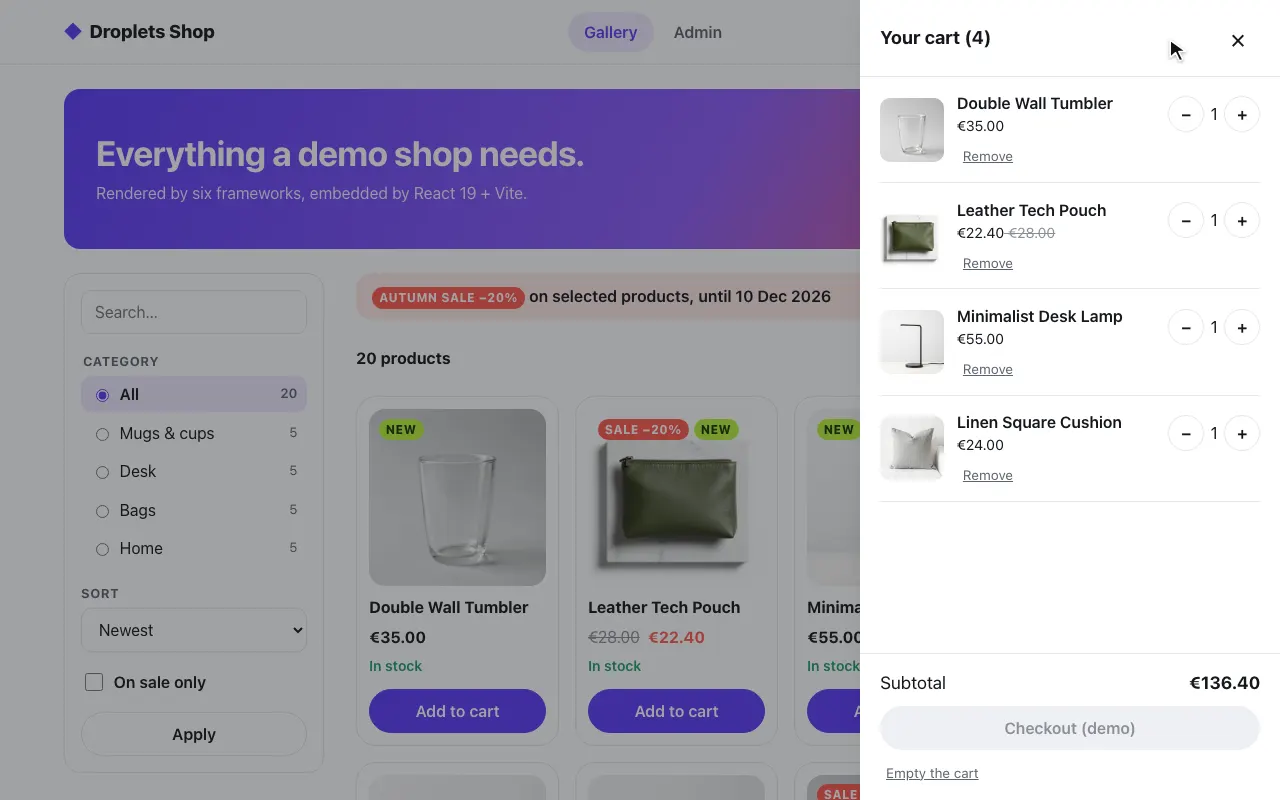 A product in the cart
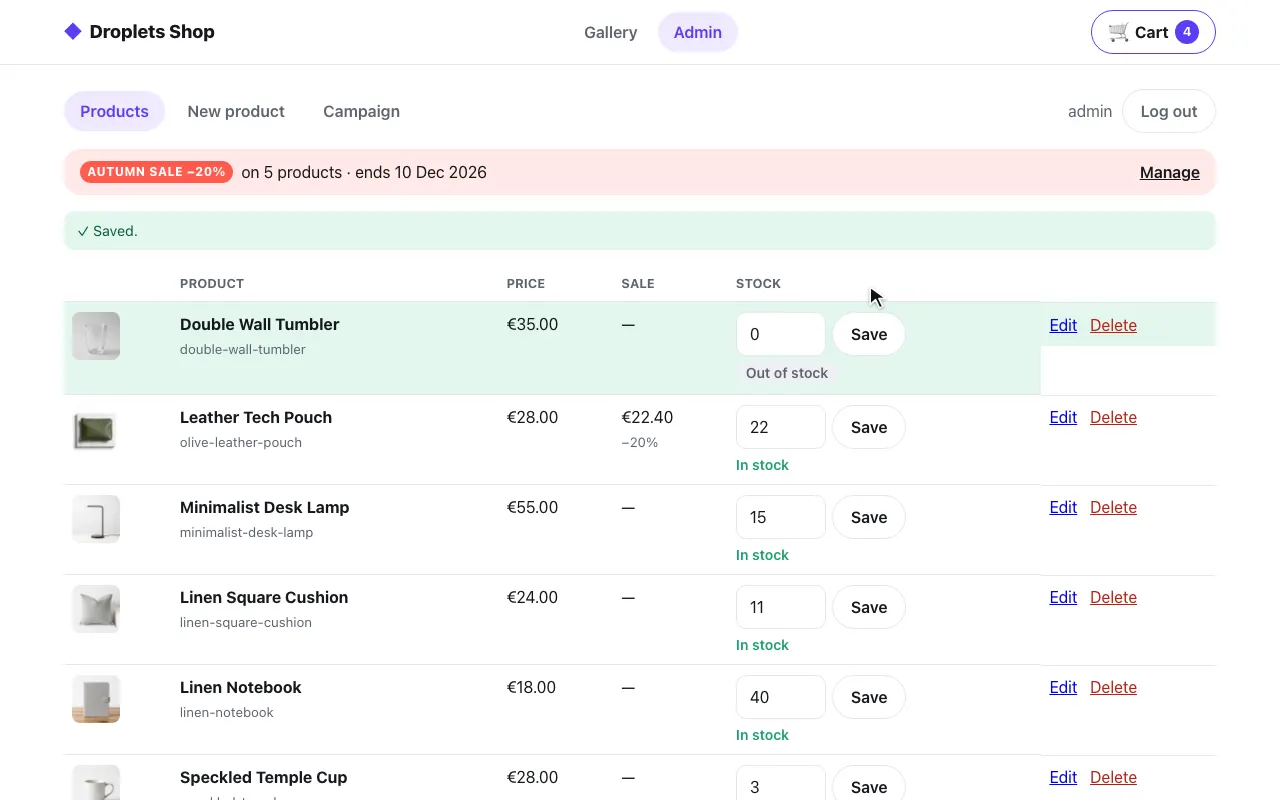 The admin: stock set to 0
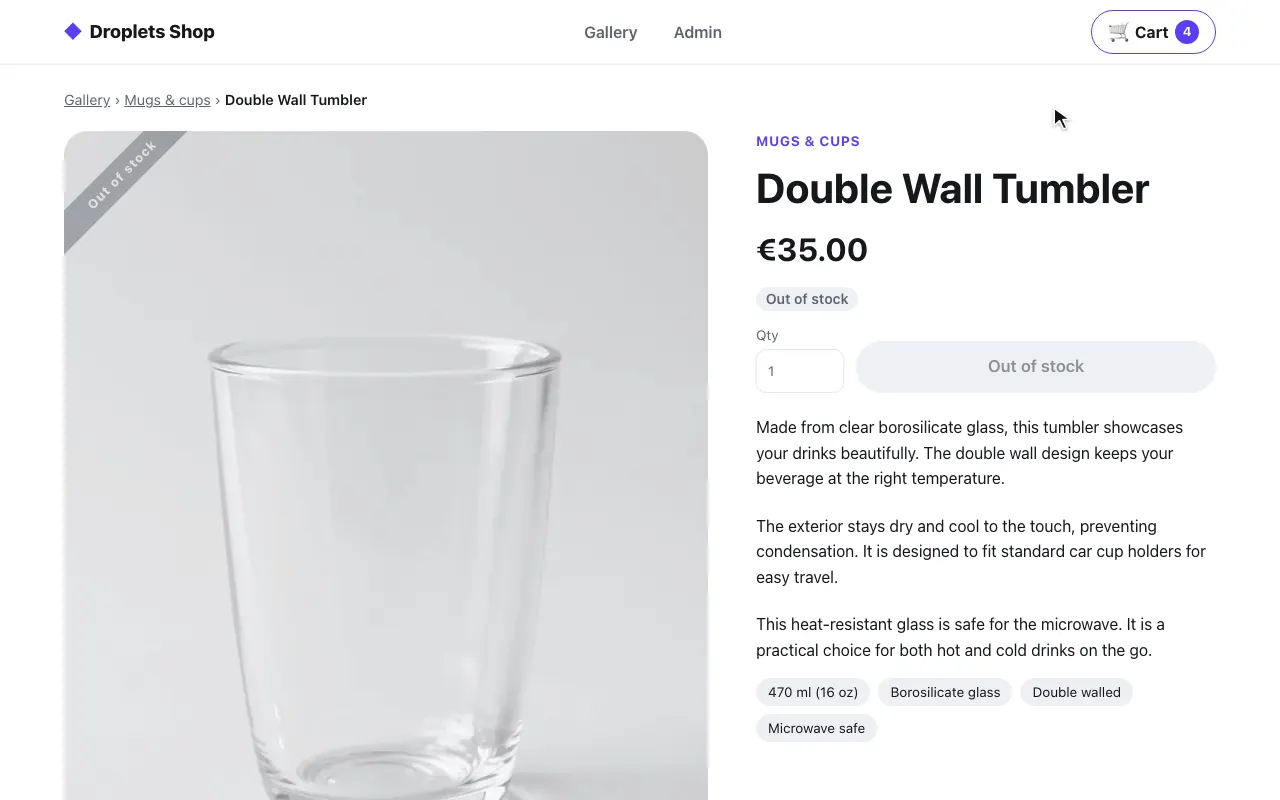 The product page: out of stock
The code is in examples/hosts/react-vite: src/shop/ (the pages and
ShopDroplet.tsx), src/router.ts, nginx.conf and vite.config.ts.
Pieces and ports
Section titled “Pieces and ports”docker-compose.yml starts three services:
| Service | Port | What it is |
|---|---|---|
web |
8004, on 127.0.0.1 |
nginx:1.27-alpine serving the built app (index.html for every route) and proxying the shop |
shop |
8300, internal only | the shop’s droplets server (examples/shop) |
droplets |
8000, on 127.0.0.1 |
the Svelte example’s droplets server, for the basic page only, reached by the browser directly (VITE_DROPLETS_URL at build) |
There is no server code. nginx.conf writes out the shop’s internal address
(proxy_pass http://shop:8300); it is a template (the nginx image’s
/etc/nginx/templates/), so the public one, x-droplet-location ${SHOP_PUBLIC_URL},
comes from SHOP_PUBLIC_URL (http://localhost:8004) at start. Under vite dev and vite preview,
server.proxy does the same from SHOP_INTERNAL_URL and SHOP_PUBLIC_URL.
How a page gets a droplet
Section titled “How a page gets a droplet”Client-only. The pages fetch each fragment from the browser, through the
proxy, and insert it; the element upgrades and hydrates itself. The code is
ShopFragment, shown in the pattern above.
The browser sends the shop’s cookies and the page’s URL as Referer itself:
same origin. The cart badge is client-only: a
<djs-shop data-droplet="shopping-cart"> the app writes, which fetches
its own data. So are the toasts, first in the layout and kept across
client-side navigations; /index.js installs window.shopMessageQueue
before any droplet starts (the shop’s src/hooks.client.ts):
<ShopClientDroplet id="toast-center" params={{}} /><header className="shop-header">…<ShopClientDroplet id="shopping-cart" params={{ variant: "badge" }} />…</header>What it proxies
Section titled “What it proxies”location ~ ^/(index\.js$|env\.js$|index\.css$|droplets/|assets/|api/) in nginx.conf passes
/index.js, /env.js, /index.css, /droplets/* (fragments, _data, form actions), /assets/*
and /api/* to the shop with x-droplet-location written out,
Forwarded/X-Forwarded-* cleared (the shop reads them only as a fallback
for its location, and trusts them only against its allow-list), the
browser’s Cookie cut down to the shop’s own cart_id and shop_admin
(the map at the top of the file), and bodies up to 4 MB for the admin’s
image uploads. Every request the page makes is
same-origin: no CORS, and the shop’s cookies are the app’s own. The
enhanced forms (adding to the cart) post by fetch; the login form is a
native post through the proxy, so the shop’s 303 and Set-Cookie reach
the browser as they are.
Under vite dev and vite preview, server.proxy in vite.config.ts
does the same:
// vite.config.ts (trimmed)const HOST_HEADERS = ["forwarded", "x-forwarded-host", "x-forwarded-proto", "x-forwarded-prefix", "x-forwarded-for"];const SHOP_COOKIES = ["cart_id", "shop_admin"]; // shopCookies() keeps these of the browser's Cookie
const env = loadEnv(mode, ".", "SHOP_");const target = env["SHOP_INTERNAL_URL"] ?? "http://localhost:8300";const publicUrl = env["SHOP_PUBLIC_URL"] ?? "http://localhost:8004";
const shop: ProxyOptions = {  target,  headers: { "x-droplet-location": publicUrl },  configure: (proxy) => {    const emitter = proxy as unknown as ProxyEvents;    emitter.on("proxyReq", (request) => {      for (const name of HOST_HEADERS) request.removeHeader(name);      const cookie = shopCookies(String(request.getHeader("cookie") ?? ""));      if (cookie) request.setHeader("cookie", cookie);      else request.removeHeader("cookie");    });  },};const proxy = { "^/index\\.js$": shop, "^/env\\.js$": shop, "^/index\\.css$": shop, "/droplets/": shop, "/assets/": shop, "/api/": shop };
Gotchas
Section titled “Gotchas”- No server rendering, no page without JavaScript. The pages render in the browser, so nothing shows before the app’s bundle runs, and with JavaScript off there is no form to post: the end-to-end test’s no-JavaScript run skips this host.
- The app’s own files live under
/app/(build.assetsDir: "app"), so/assets/*stays the shop’s. - Redirects are opaque in the browser. With
redirect: "manual", a fragment’s 3xx has no readable target, so the product page replaces its URL withoutvitself.
Run it
Section titled “Run it”cd examples/hosts/react-vitedocker compose up --buildopen http://localhost:8004/gallery # log in as admin / dropletsSet SHOP_SECRET and DROPLETS_SECRET first; compose refuses to start
without them. The shop trusts one origin besides its own,
DROPLETS_TRUSTED_ORIGINS: http://localhost:8004, this host’s; the rest of
its environment is the same on every host: see
Running a host. Here DROPLETS_SECRET serves the login’s native post: its 303 lands
back on the app’s page, whose fragments are fetched again with that URL as
Referer.
The Svelte example
Section titled “The Svelte example”Every path but the shop’s (/gallery, /login, /admin,
/product/<slug>) renders the Svelte example: its three droplets, one per
mode, from examples/frameworks/svelte (the droplets service). Unlike
the shop, they come straight from the droplets server’s own origin, with
no proxy: VITE_DROPLETS_URL, http://localhost:8000 by default, a build
argument of the image.
A single-page app has no server of its own, so it cannot paste fragments in
before the page ships. src/droplets.tsx wraps a droplet in a React
component, <Droplet>, with two modes:
fragment(the default) fetchesGET /droplets/<id>?<props>from the browser and inserts the server-rendered HTML through a<template>; the droplet’s own JavaScript then hydrates it.clientwrites the droplet element itself (the server’selementsetting,djs-sveltefor the Svelte example,VITE_DROPLETS_ELEMENT) withdata-dropletanddata-droplet-context, the props as base64 JSON{ props }. The element runs the droplet in the browser, fetching/droplets/<id>/_datawhen it has a server load. Nothing shows until its bundle loads.
// src/droplets.tsx (trimmed)export const DROPLETS_URL: string =  import.meta.env.VITE_DROPLETS_URL ?? "http://localhost:8000";
export const DROPLETS_ELEMENT: string =  import.meta.env.VITE_DROPLETS_ELEMENT ?? "djs-svelte";
const encodeContext = (props: Record<string, unknown>) =>  btoa(String.fromCharCode(...new TextEncoder().encode(JSON.stringify({ props }))));
export function Droplet({ id, props = {}, mode = "fragment", origin = DROPLETS_URL }: DropletProps) {  const host = useRef<HTMLDivElement>(null);  const [error, setError] = useState<string | null>(null);  const propsKey = JSON.stringify(props);
  useEffect(() => {    ensureDropletsClient(origin); // <origin>/index.js, once per page    const target = host.current;    if (!target) return;
    if (mode === "client") {      const element = document.createElement(DROPLETS_ELEMENT);      element.dataset["droplet"] = id;      element.dataset["dropletContext"] = encodeContext(props);      target.replaceChildren(element);      return () => target.replaceChildren();    }
    const controller = new AbortController();    const url = new URL(`/droplets/${encodeURIComponent(id)}`, origin);    for (const [key, value] of Object.entries(props)) url.searchParams.set(key, String(value));
    fetch(url, { signal: controller.signal, redirect: "manual", headers: { accept: "text/html" } })      .then(async (response) => {        if (response.type === "opaqueredirect") throw new Error("redirected");        const isFragment =          (response.ok || response.status === 500) && (response.headers.get("content-type") ?? "").startsWith("text/html");        if (!isFragment) throw new Error(`HTTP ${response.status}`);        const template = document.createElement("template");        template.innerHTML = await response.text();        target.replaceChildren(template.content);        setError(null);      })      .catch((cause: unknown) => {        if (controller.signal.aborted) return;        setError(String(cause));      });
    return () => {      controller.abort();      target.replaceChildren();    };  }, [id, mode, origin, propsKey]);
  if (error) return <p className="error">droplet "{id}" unavailable: {error}</p>;  return <div ref={host} data-react-host={id} />;}
// src/App.tsx (trimmed)const IDS = ["ssr-hydrate", "ssr-nohydrate"];
const [who, setWho] = useState("React");…{IDS.map((id) => ( <Droplet key={id} id={id} props={{ who }} />))}<Droplet id="client" mode="client" />Typing in the page’s input changes who, and the two fragments are asked
for again. React owns the wrapper <div>; the custom element owns
everything inside it. The effect’s cleanup clears the wrapper, so React
never tries to reconcile the droplet’s DOM.
This <Droplet> checks the answer the way the shop’s ShopFragment does:
only a text/html answer is inserted, a 2xx or a 500 (which carries
the droplet’s error page), redirect: "manual" keeps a redirect from being
followed, and anything else becomes an error note. What it lacks is the
shop’s onRedirect, since the basic droplets never redirect.
The page and the droplets server are different origins, so the browser
loads /index.js, the bundles and the fragments cross-origin: the Svelte
example runs with cors: true. No x-droplet-location is needed, since
the browser reaches the droplets server at the URL it is published on. Its
DROPLETS_TRUSTED_ORIGINS lists that URL and the app’s
(http://localhost:8004), the Origin the browser sends, which becomes
the droplet’s host.