SvelteKit
How a SvelteKit app embeds droplets: a server load fetches each fragment,
and {@html} renders it into the page.
The pattern in SvelteKit
Section titled “The pattern in SvelteKit”// src/lib/shop.server.ts, fragment() (trimmed)async function fragment(page: PageRequest, id: string, params = new URLSearchParams()): Promise<Fragment> { const url = `${internal}/droplets/${encodeURIComponent(id)}?${params}`; const headers: Record<string, string> = { accept: "text/html", "x-droplet-location": origin, referer: origin + page.path }; const cookie = shopCookies(page.cookie); if (cookie) headers["cookie"] = cookie; const result: Fragment = { html: "", status: 502, location: null, cookies: [], link: null }; const response = await fetch(url, { headers, redirect: "manual", cache: "no-store" }); result.status = response.status; result.cookies = response.headers.getSetCookie(); result.link = response.headers.get("link"); if (response.status >= 300 && response.status < 400) { result.location = response.headers.get("location"); } else if ( (response.ok || response.status === 500) && (response.headers.get("content-type") ?? "").startsWith("text/html") ) { result.html = await response.text(); return result; } // … anything else: result.html becomes a "droplet is unavailable" note return result;}<!-- src/routes/(shop)/+layout.svelte, in <svelte:head>: once per page --><script type="module" src="/index.js"></script><!-- src/routes/(shop)/gallery/+page.svelte: the fragment's HTML, as it came --><aside>{@html data.filter}</aside>shopFragments()insrc/lib/shop-page.server.tstakespagefrom the load’sevent:event.url’s path and query, and the browser’sCookie.fragment()sendsGET /droplets/<id>?<params>toSHOP_INTERNAL_URLwithaccept: text/html,x-droplet-locationset to the origin ofSHOP_PUBLIC_URL, the shop’s own cookies from it (cart_id,shop_admin) and the page’s URL asreferer.redirect: "manual"keeps a droplet’s 3xx, whichshopFragments()answers with SvelteKit’sredirect(); the fragments’Set-Cookiego toevent.locals.shopCookies, whichhandleappends to the page’s response, sentprivate, no-store.- Only a
text/htmlanswer (a 2xx, or a 500 carrying the droplet’s error page) is pasted;{@html}writes it unescaped. handleinsrc/hooks.server.tspasses/index.js,/env.js,/index.css,/droplets/*,/assets/*and/api/*on to the shop before any routing:
if (PROXIED.test(event.url.pathname)) return shop.proxy(event.request);The shop demo, recorded
Section titled “The shop demo, recorded”The shop demo on SvelteKit 2, recorded by the end-to-end test. How the pieces fit has the diagram.
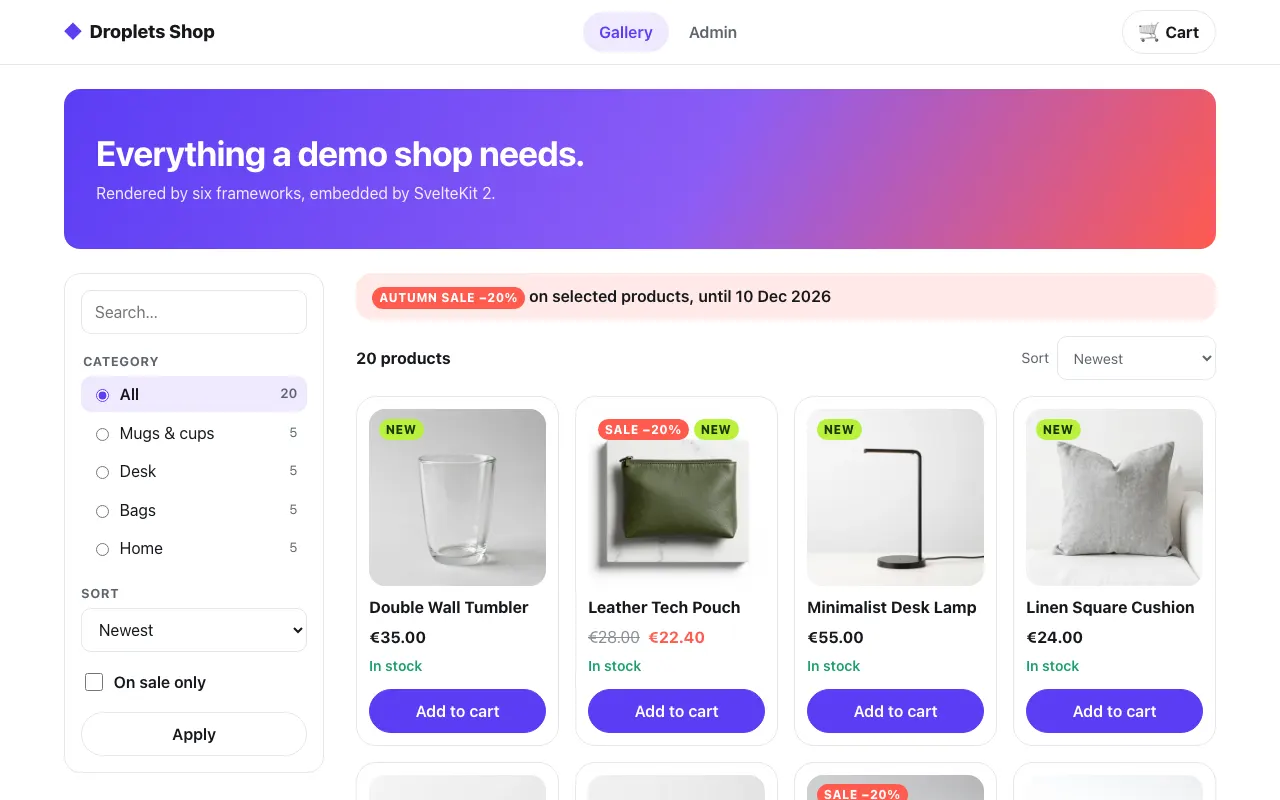 The gallery
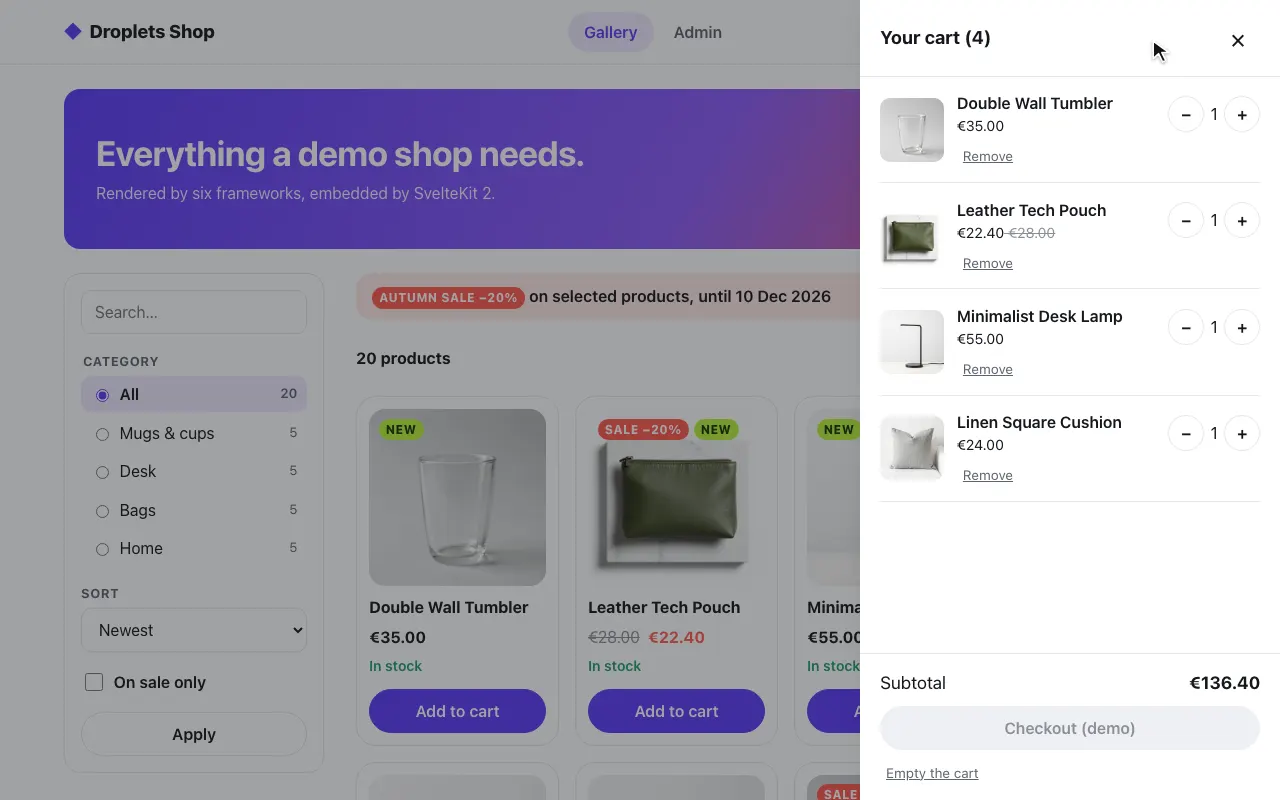 A product in the cart
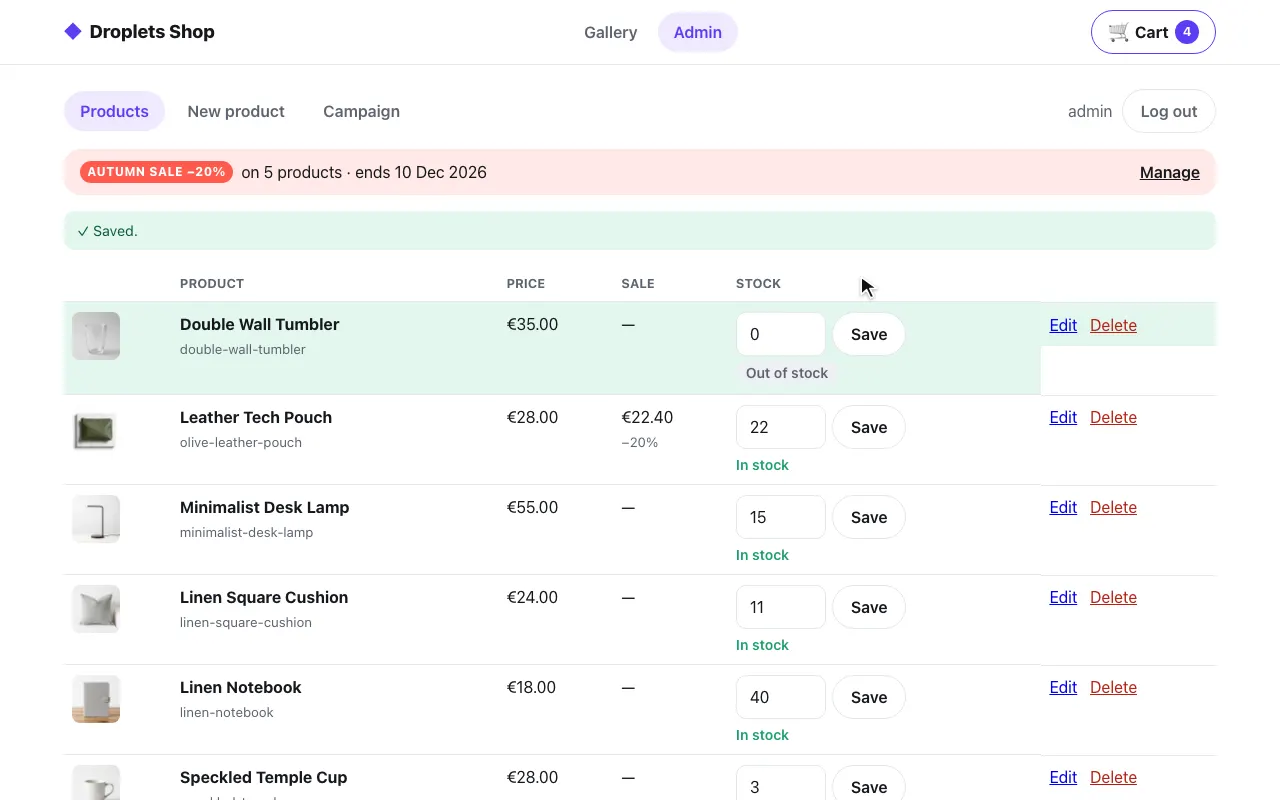 The admin: stock set to 0
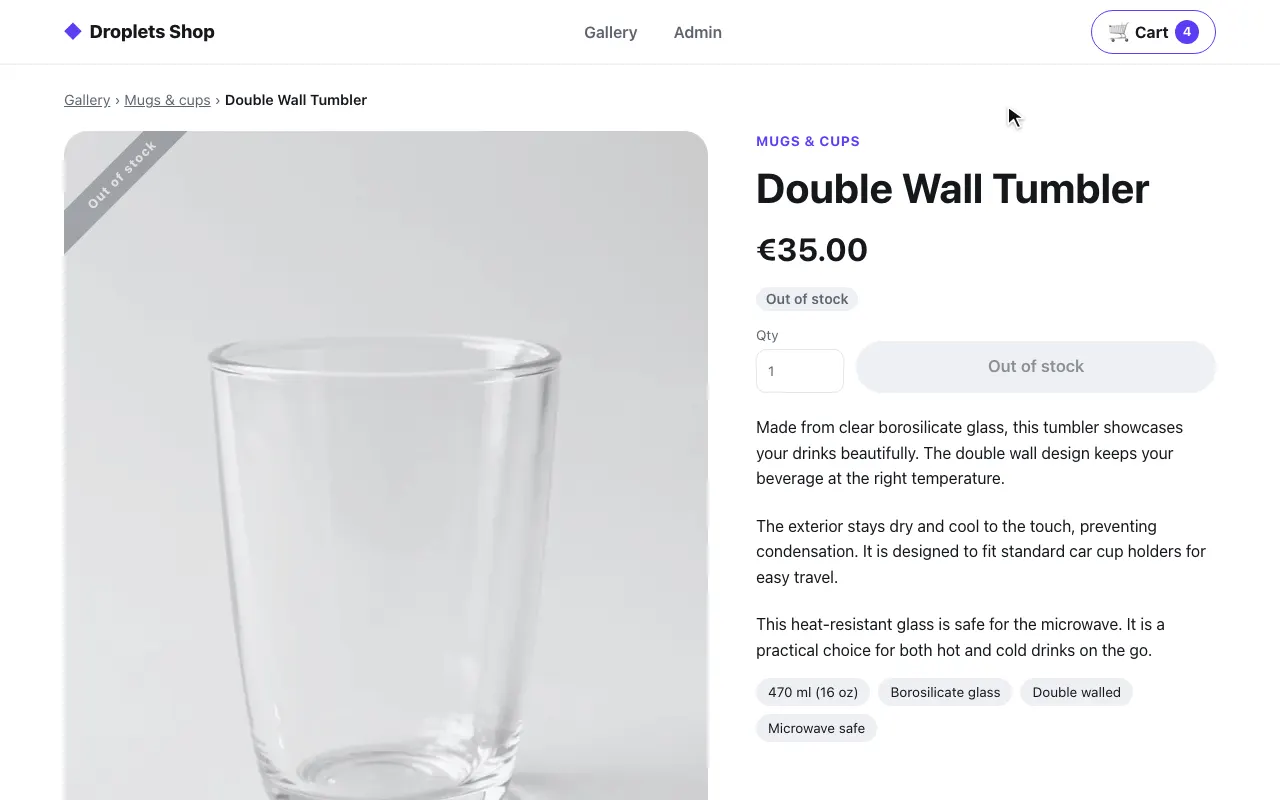 The product page: out of stock
The code is in examples/hosts/sveltekit/src: hooks.server.ts, the (shop)
route group, lib/shop-page.server.ts (the SvelteKit side) and
lib/shop.server.ts (the framework-free fetches and proxy).
Pieces and ports
Section titled “Pieces and ports”docker-compose.yml starts three services:
| Service | Port | What it is |
|---|---|---|
web |
8006, public | SvelteKit with adapter-node: the shop’s pages, the proxy, and the basic page at / |
shop |
8300, internal only | the shop’s droplets server (examples/shop) |
droplets |
8000, public | the Svelte example’s droplets server, for / only |
On web |
Value | Used for |
|---|---|---|
SHOP_INTERNAL_URL |
http://shop:8300 |
internal: fragment fetches and the proxy |
SHOP_PUBLIC_URL |
http://localhost:8006 |
public: this host’s own origin, sent as x-droplet-location |
ORIGIN |
http://localhost:8006 |
adapter-node’s origin, which SvelteKit checks form posts against |
BODY_SIZE_LIMIT |
4M |
above the 512 KB default, for the admin’s image uploads |
DROPLETS_INTERNAL_URL, DROPLETS_PUBLIC_URL |
http://droplets:8000, http://localhost:8000 |
the same pair, for the basic page |
How a page gets a droplet
Section titled “How a page gets a droplet”A server fetch in +page.server.ts, rendered with {@html}:
// src/lib/shop-page.server.ts, called from each (shop) +page.server.ts loadexport async function shopFragments(event: RequestEvent, wanted: [id: string, params: URLSearchParams][]) { const page = { path: event.url.pathname + event.url.search, cookie: event.request.headers.get("cookie") }; const results = await Promise.all(wanted.map(([id, params]) => shop.fragment(page, id, params))); (event.locals.shopCookies ??= []).push(...results.flatMap((result) => result.cookies)); const moved = results.find((result) => result.location); if (moved) redirect(moved.status as Redirect, moved.location!); return { fragments: results.map((result) => result.html), head: shop.linkTags(results) };}<!-- src/routes/(shop)/gallery/+page.svelte --><aside>{@html data.filter}</aside>shop.fragment sends x-droplet-location, the shop’s cookies from the browser’s Cookie and the page’s URL
as Referer (the droplet’s
host, query
included), uses redirect: "manual" and cache: "no-store", and returns
only text/html answers; anything else becomes a “droplet is unavailable”
note. The fragments of one load are fetched in parallel. The product page
first reads GET /droplets/product-page/_data?slug=… for the product’s id
and name, and throws error(404) when there is none, which the (shop)
group’s +error.svelte renders.
The (shop) layout’s +layout.server.ts fetches toast-center and
shopping-cart with variant=badge through the same shopFragments().
The layout and each page put their fragments’ Link preloads in
<svelte:head> as <link> tags (only preload and modulepreload, only on
this host’s origin), and the layout loads
<script type="module" src="/index.js"> once, through the proxy. The
toast-center fragment comes first in the layout; /index.js installs
window.shopMessageQueue before any droplet starts (the shop’s
src/hooks.client.ts):
<!-- src/routes/(shop)/+layout.svelte --><div data-sveltekit-reload style="display: contents">{@html data.toasts}<header class="shop-header">…<div class="shop-cart">{@html data.cart}</div>…</header>What it proxies
Section titled “What it proxies”handle in src/hooks.server.ts sends /index.js, /env.js, /index.css, /droplets/*
(fragments, _data, form actions), /assets/* and /api/* to
shop.proxy (src/lib/shop.server.ts) before any routing. The proxy sends
x-droplet-location (the origin of SHOP_PUBLIC_URL) and passes on only
accept, accept-language, content-type, if-none-match, origin,
referer, user-agent, x-droplet-props and x-droplets-build, plus
cookie cut down to the shop’s own cart_id and shop_admin: nothing that
names a host, and no other app’s cookie on this origin. The body streams
through (duplex: "half"), redirects are not followed, each request times
out (15 seconds; fragments 10, the product lookup 5), and the answer comes
back with its Set-Cookie
untouched, minus content-encoding, content-length and the hop-by-hop
headers. When the shop is down it answers 502. The shop’s cookies are
first-party, and nothing is cross-origin; the shop sets them only from form
actions and /api, which come through here.
Gotchas
Section titled “Gotchas”ORIGINandBODY_SIZE_LIMIT. SvelteKit checks form posts against adapter-node’sORIGINeven on the proxied paths, so without it the shop’s form posts are rejected as cross-site; the Dockerfile sets it to the image’s own address (http://localhost:8006), and the compose file toWEB_URL. Without a higherBODY_SIZE_LIMIT(4Min both), adapter-node cuts the admin’s uploads off at 512 KB.- Fragment cookies go out from
handle, appended as they came, never throughcookies.set, which would re-encode them. - Shop links reload the page (
data-sveltekit-reloadin the layout), so each page is fetched with its fragments, as on every other host.
Run it
Section titled “Run it”cd examples/hosts/sveltekitdocker compose up --buildopen http://localhost:8006/gallery # log in as admin / dropletsSet SHOP_SECRET and DROPLETS_SECRET first; compose refuses to start
without them. The shop trusts one origin besides its own,
DROPLETS_TRUSTED_ORIGINS: http://localhost:8006, this host’s; the rest of
its environment is the same on every host: see
Running a host.
The Svelte example
Section titled “The Svelte example”The same app serves the Svelte example at /: its three droplets, one per mode, from examples/frameworks/svelte (the droplets service).
Droplets are Svelte components too, but from the outside a droplets server is a remote service like any other. SvelteKit treats it as one.
import { DROPLETS_PUBLIC_URL, fragment } from "$lib/droplets.server.ts";import type { PageServerLoad } from "./$types";
// The Svelte example's droplets (examples/frameworks/svelte), one per mode.const IDS = ["client", "ssr-hydrate", "ssr-nohydrate"];
export const load: PageServerLoad = async ({ fetch, url }) => {  const who = url.searchParams.get("who") ?? "SvelteKit";  const fragments = await Promise.all(    IDS.map((id) => fragment(fetch, id, { who })),  );  return { dropletsUrl: DROPLETS_PUBLIC_URL, fragments };};
<!-- src/routes/+page.svelte (trimmed) --><script lang="ts"> let { data } = $props();</script>
<svelte:head> <script type="module" src="{data.dropletsUrl}/index.js"></script></svelte:head>
{#each data.fragments as fragment} {@html fragment}{/each}fragment() in src/lib/droplets.server.ts reads both addresses from
$env/dynamic/private (default http://localhost:8000) and uses the
fetch SvelteKit hands to load, so the fragments are fetched during
server rendering and never again on the client. It sends
x-droplet-location: DROPLETS_PUBLIC_URL with redirect: "manual" and a
5 second AbortSignal.timeout, pastes only a text/html answer (a 2xx, or a
500 carrying the droplet’s error page), and renders a <p class="error">
for anything else, the id and the error escaped.
Here the page loads /index.js from the droplets server’s own origin
(http://localhost:8000), so the browser fetches bundles and data across
origins: the Svelte example runs with cors: true, and the droplets
service lists both DROPLETS_URL and WEB_URL in
DROPLETS_TRUSTED_ORIGINS.