htmx
How static pages embed droplets with htmx: hx-get swaps each fragment in
from the browser, /index.js makes it live, and hx-boost moves between
the shop’s pages by swapping <main> alone, so the page behaves as one app.
The pattern in htmx
Section titled “The pattern in htmx”<!-- html/gallery.html (trimmed) --><head> <link rel="stylesheet" href="/shop.css"> <script src="/vendor/htmx.min.js"></script> <script type="module" src="/index.js"></script> <script src="/shop.js"></script></head><body class="shop" hx-boost="true" hx-target="main" hx-select="main" hx-swap="outerHTML show:window:top"> <djs-shop data-droplet="toast-center"></djs-shop> <header class="shop-header">… <div class="shop-cart"><djs-shop data-droplet="shopping-cart" data-droplet-props='{"variant":"badge"}'></djs-shop></div> </header> <main class="shop-main shop-wrap" hx-history-elt hx-disinherit="*"> <div hx-get="/droplets/product-library" hx-trigger="load" data-page-query="q category sort onSale page"> <p class="shop-loading">Loading the products…</p> </div> </main></body>location = /gallery { rewrite ^ /gallery.html last;}location ~ ^/(index\.js$|env\.js$|index\.css$|droplets/|assets/|api/) { proxy_pass http://shop; proxy_set_header Cookie $shop_cookie; proxy_set_header x-droplet-location ${SHOP_PUBLIC_URL}; proxy_set_header Forwarded ""; proxy_set_header X-Forwarded-Host ""; proxy_set_header X-Forwarded-Proto ""; proxy_set_header X-Forwarded-Prefix "";}- nginx serves the page as a file. When it loads (
hx-trigger="load"), htmx asks forGET /droplets/product-libraryfrom the browser and puts the answer inside the<div>, in place of its placeholder;shop.jsadds the page’s query parameters the element lists indata-page-query(Props from the page’s URL). - The request is same-origin, through nginx: the browser sends its cookies
and the page’s URL as
Refereritself, and nginx cuts theCookiedown to the shop’s owncart_idandshop_admin(amap), addsx-droplet-locationand clearsForwardedandX-Forwarded-*.nginx.confis a template; the nginx image fills in${SHOP_PUBLIC_URL}(http://localhost:8010) when it starts. /index.js, loaded once, defines the shop’s droplet element (djs-shop), so each fragment htmx swaps in upgrades and hydrates as it lands. nginx passes/index.js,/env.js,/index.css,/droplets/*,/assets/*and/api/*on to the shop.- The
<body>’shx-boost,hx-targetandhx-selectmake every link a swap of<main>alone;<main>’shx-disinherit="*"keeps all of that away from the droplets (The shop as one page).
The htmx pages, recorded
Section titled “The htmx pages, recorded”The shop’s pages, recorded by the end-to-end test
(tests/hosts/e2e/htmx.spec.ts): the gallery, a product opened from its
card (only <main> changes, the header stays), added to the cart, the
admin’s login with a wrong password, the admin, and the card under the
gallery asked for once revealed. The droplets are the
shop demo’s.
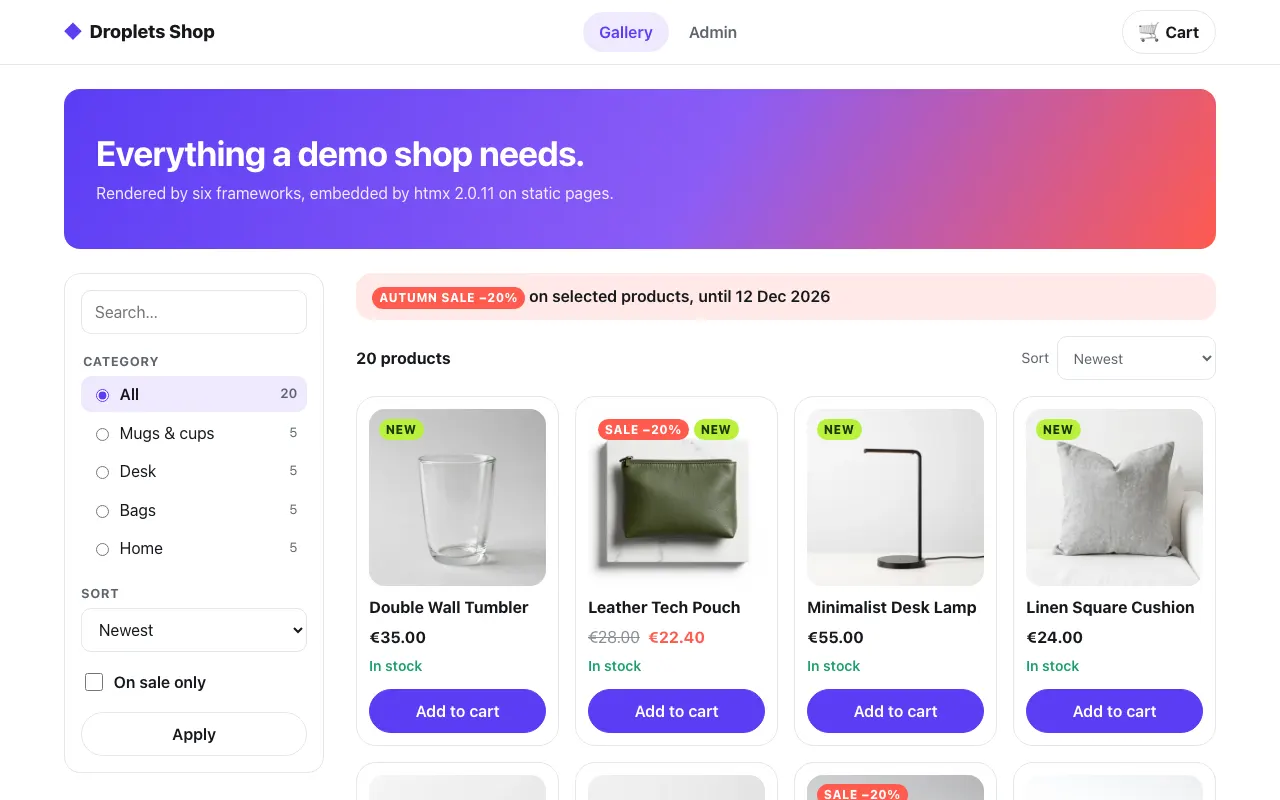 The gallery, swapped in by htmx
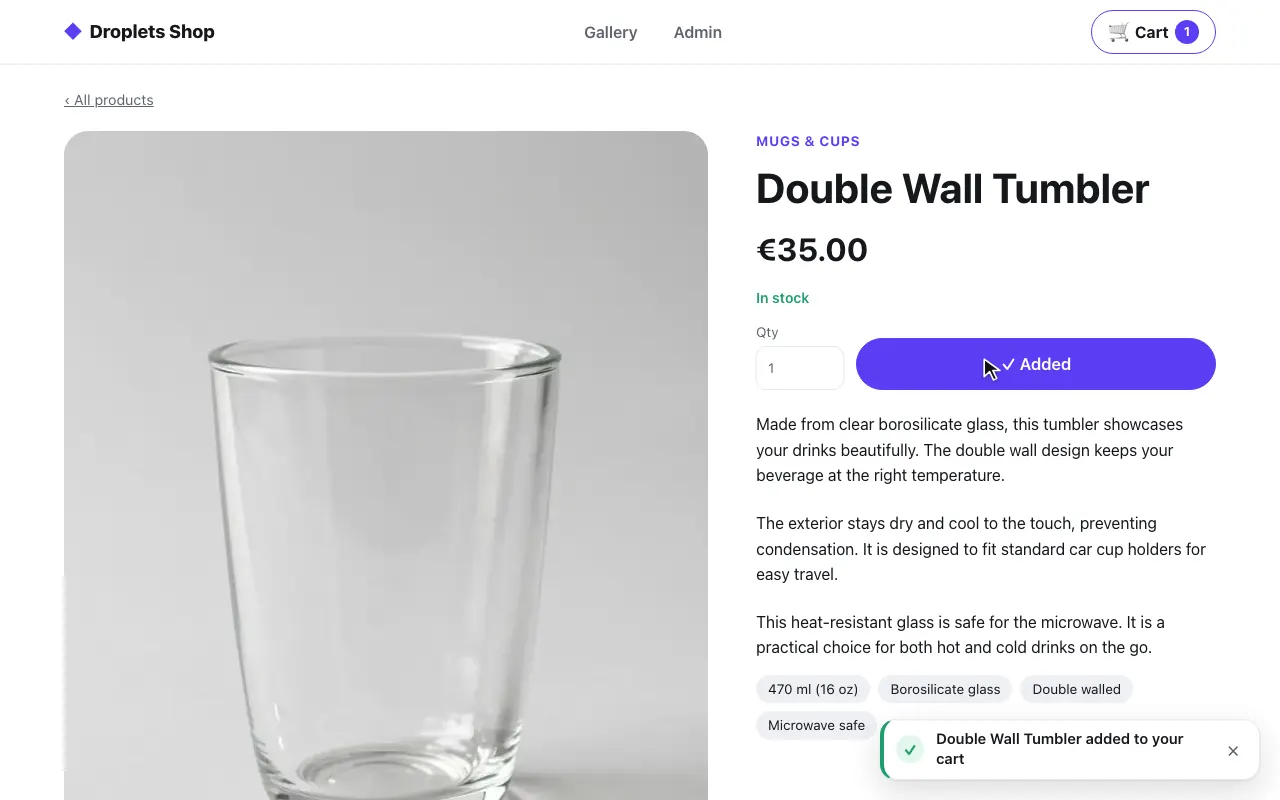 A product page, its form posted in place
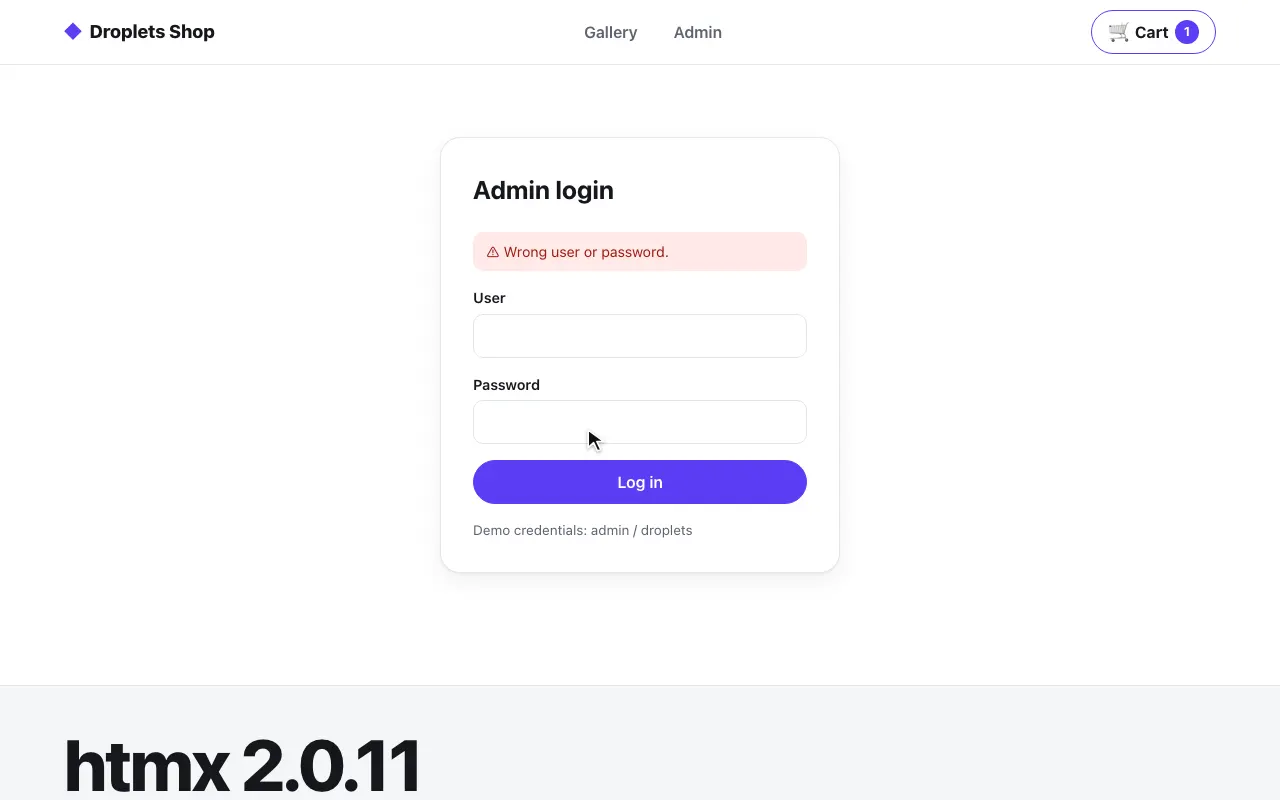 A plain form, back by Post/Redirect/Get
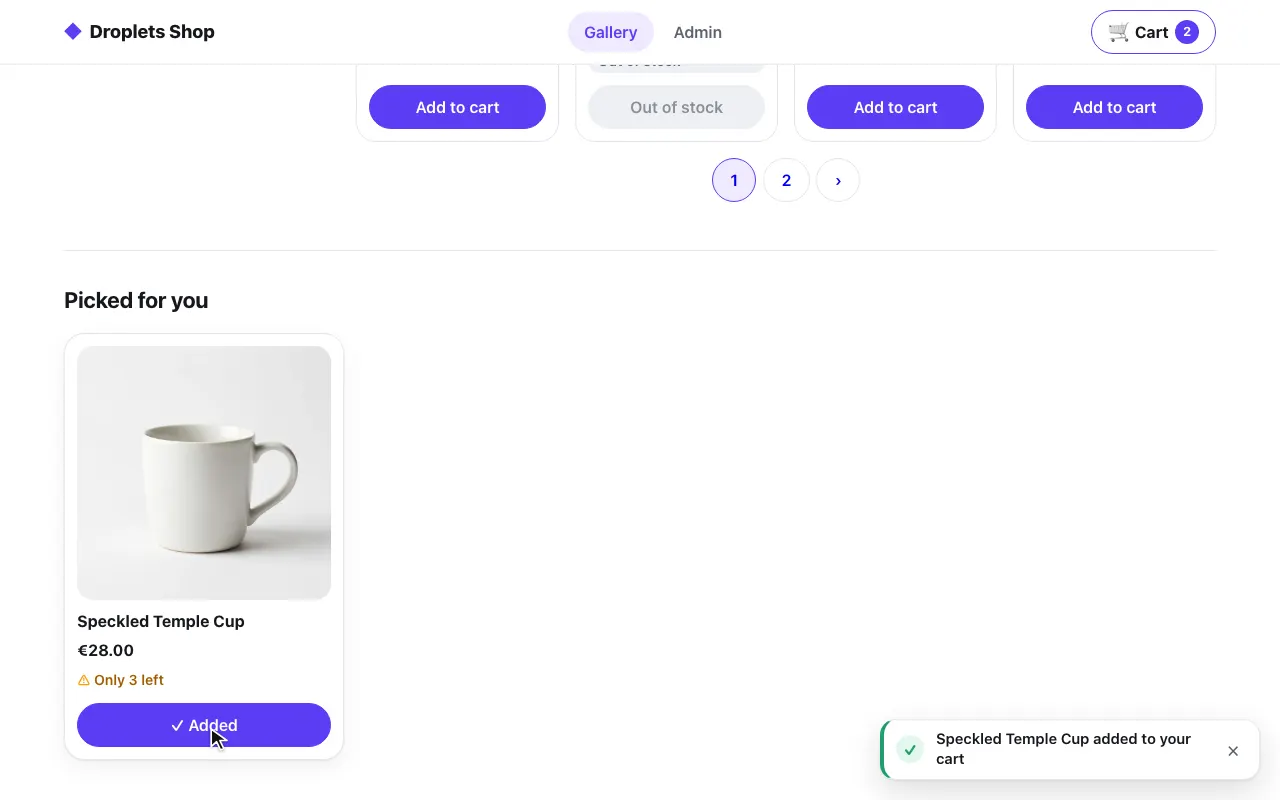 A card asked for once revealed
The code is in examples/hosts/htmx: the shop’s four static pages
(html/gallery.html, product.html, login.html, admin.html), the page
of the Svelte example’s droplets (html/index.html), html/shop.js,
nginx.conf, and the Dockerfile that copies htmx in. The shop’s pages use
the same shop.css as every other shop host; site.css adds the
placeholders, the featured card and the Svelte page’s look.
Pieces and ports
Section titled “Pieces and ports”docker-compose.yml starts three services:
| Service | Port | What it is |
|---|---|---|
web |
8010, on 127.0.0.1 |
nginx:1.27-alpine serving the pages and htmx, and proxying the shop under its own origin |
droplets |
8000, on 127.0.0.1 |
the Svelte example’s droplets server: the browser asks it for fragments directly, cross-origin |
shop |
8300, internal only | the shop’s droplets server (examples/shop), behind web |
| Path | File | Droplets |
|---|---|---|
/gallery |
gallery.html |
product-filter, product-library (the page’s q, category, sort, onSale, page), and product-card once revealed |
/product/<slug> |
product.html |
product-page (slug), then product-comments (the product’s id; order, page, showing) |
/login |
login.html |
login (next) |
/admin |
admin.html |
product-admin (view, id) |
/ |
index.html |
the Svelte example’s ssr-hydrate, client and ssr-nohydrate, cross-origin |
Every shop page writes the cart badge and the toasts itself, outside
<main>: <djs-shop data-droplet="shopping-cart" data-droplet-props='{"variant":"badge"}'>
and <djs-shop data-droplet="toast-center">, which render in the browser
and fetch their own data. nginx.conf gives a page only to a slug of the
shop’s shape ([a-z0-9]+(?:-[a-z0-9]+)*); any other /product/… is a 404.
htmx is the npm package htmx.org 2.0.11, pinned in package.json and
package-lock.json: the Dockerfile installs it with npm ci --ignore-scripts
and copies dist/htmx.min.js into the nginx image as /vendor/htmx.min.js.
No CDN is involved.
nginx.conf is a template (the nginx image’s /etc/nginx/templates/):
SHOP_PUBLIC_URL (http://localhost:8010) and DROPLETS_PUBLIC_URL
(http://localhost:8000) are filled in at start. The Svelte page is written
for the default ports; when the droplets server is published elsewhere
(DROPLETS_PORT, DROPLETS_URL), sub_filter rewrites
http://localhost:8000 in it to DROPLETS_PUBLIC_URL.
Both droplets servers list http://localhost:8010 in
DROPLETS_TRUSTED_ORIGINS. For the shop, it is the origin of the
x-droplet-location nginx sends and of the pages’ form posts. For the
Svelte example, it is the page’s Origin, which htmx’s cross-origin
requests carry: the droplet’s host is that origin, within the list.
Run it
Section titled “Run it”cd examples/hosts/htmxdocker compose up --buildopen http://localhost:8010/gallery # the shop; / has the Svelte dropletsSet SHOP_SECRET and DROPLETS_SECRET first (32 or more random characters
each, openssl rand -hex 32), in the environment or a .env file beside
docker-compose.yml: compose refuses to start without them. pnpm test:hosts
generates its own for a run.
pnpm test:hosts htmx runs it end to end (tests/hosts/e2e/htmx.spec.ts),
from the repository root; htmx runs only by name, not in the default set.
The test also loads each kind of page directly, turns JavaScript off, and
checks that the Svelte example answers htmx’s preflight with 204,
access-control-allow-origin: * and the HX-* headers echoed.
tests/hosts/test/htmx.test.ts checks, without Docker, that the four shop
pages share their head, header and footer.
Swapping a droplet in
Section titled “Swapping a droplet in”htmx is built around HTML fragments from a server, and a droplets server
serves exactly that: GET /droplets/<id> answers a droplet element with its
server-rendered markup. Load /index.js once and every droplet element on
the page comes alive, whether it was there at first or htmx swapped it in
later. Nothing renders the page on a server: it is a static file.
<head> <script src="/vendor/htmx.min.js"></script> <script type="module" src="http://localhost:8000/index.js"></script></head><body> <section hx-get="http://localhost:8000/droplets/ssr-hydrate?who=htmx" hx-trigger="load"> <p>Loading…</p> </section></body>htmx asks for the fragment and puts it in the section (the default
innerHTML swap). The browser upgrades the element as soon as it is in
the document, since /index.js defined it, and the element does what it
does on any page:
- it links its stylesheet inside itself (the fragment’s
<link data-droplet-style>) and waits for it before it mounts, so the markup never shows unstyled; - it hydrates as the droplet says:
ssr-hydratehydrates at once,clientrenders in the browser and fetches its data,ssr-nohydratestays server HTML and loads no bundle, and the shop’sproduct-cardloads its bundle only when it is about to scroll into view (hydrate = "visible"); - its JavaScript, CSS and data come from where
/index.jscame from, here the droplets server’s own origin.
htmx leaves the fragment’s <script type="application/text"> tags alone:
it runs only JavaScript scripts in swapped content.
When it loads: hx-trigger
Section titled “When it loads: hx-trigger”The trigger decides when the fragment is asked for. The Svelte page uses three:
<!-- As soon as the page loads. --><section hx-get="http://localhost:8000/droplets/ssr-hydrate?who=htmx" hx-trigger="load">…</section>
<!-- When asked: the fragment goes into #on-click. --><button hx-get="http://localhost:8000/droplets/client?who=Ana" hx-target="#on-click">Load the client droplet</button><div id="on-click"></div>
<!-- Only once it scrolls into view: nothing is requested before. --><section hx-get="http://localhost:8000/droplets/ssr-nohydrate?who=htmx" hx-trigger="revealed">…</section>
revealed delays the fragment itself: before the section is in view, no
request goes to the droplets server at all. It adds up with the droplet’s
own lazy hydration: the shop’s
product card, swapped in on revealed, still loads its bundle only when
visible. The page’s first paint has no droplet markup in it, which is the
price of composing in the browser; a page that needs the markup at once
pastes the fragment on its server (every other host on this list).
Cross-origin
Section titled “Cross-origin”When the page and the droplets server are on different origins, two things need saying, one to htmx and one to the droplets server.
htmx. htmx 2 only talks to the page’s own origin by default
(selfRequestsOnly); a cross-origin hx-get is refused with an
htmx:invalidPath event and nothing is swapped. That check runs before
htmx fires htmx:validateUrl, so a listener alone cannot allow an origin:
turn it off in the page, and put the listener in its place, allowing the
droplets servers’ origins and no other. The example reads them from the
/index.js scripts the page loads (html/droplet-origins.js, a file, so
a page with a Content-Security-Policy needs no inline script):
<meta name="htmx-config" content='{"selfRequestsOnly": false}'><script src="/droplet-origins.js"></script>const origins = new Set( Array.from(document.querySelectorAll('script[type="module"][src]')) .map((script) => new URL(script.src)) .filter((url) => url.pathname.endsWith("/index.js")) .map((url) => url.origin),);
document.addEventListener("htmx:validateUrl", (event) => { const { url, sameHost } = event.detail; if (!sameHost && !origins.has(url.origin)) event.preventDefault();});A refused URL raises htmx’s own htmx:invalidPath, and no request goes
out; the end-to-end test checks it with an hx-get to a third origin.
The droplets server. htmx sends its own headers (HX-Request,
HX-Current-URL, HX-Target, HX-Trigger), so the browser asks first,
with a preflight. cors answers it:
cors: true allows every origin and echoes the headers asked for, which is
also what lets the elements import their bundles cross-origin. The Svelte
example has it.
With only that, Chrome’s console shows “Refused to get unsafe header
HX-Trigger” (and the other HX-* response headers) after each swap: htmx
reads them and CORS does not expose them. The swap works all the same. To
quiet it, expose them, and list your page’s origin while you are at it:
export default config({ cors: { origin: ["https://www.example.com"], exposeHeaders: [ "HX-Trigger", "HX-Location", "HX-Refresh", "HX-Redirect", "HX-Push", "HX-Push-Url", "HX-Replace-Url", "HX-Retarget", "HX-Reswap", "HX-Reselect", "HX-Trigger-After-Swap", "HX-Trigger-After-Settle", ], },});This is not in the example, which keeps the Svelte example’s cors: true.
Link and x-droplets-build stay exposed either way.
The cross-origin requests carry no cookies (htmx’s withCredentials is off),
and their Referer is the page’s origin alone. A droplet that needs the
visitor’s cookies, or forms that come back by Post/Redirect/Get, are
simpler on the page’s own origin: that is why the shop goes through the
proxy.
The shop as one page
Section titled “The shop as one page”The shop’s four pages are files with the same <head>, header and footer.
A link fetches the whole next page, and htmx swaps only its <main> into
this one; the header, the cart badge and the toasts stay where they are,
and /index.js never loads twice.
<body class="shop" hx-boost="true" hx-target="main" hx-select="main" hx-swap="outerHTML show:window:top"> <header class="shop-header">…</header> <main class="shop-main shop-wrap" hx-history-elt hx-disinherit="*">…</main> <footer class="shop-footer">…</footer></body>-
hx-boost="true"on the<body>turns its links into htmx requests that push the URL.hx-target="main"andhx-select="main"take the answer’s<main>and swap it for this one (outerHTML), andshow:window:topscrolls to the top, as a page load would. htmx also sets the<title>from the answer. -
The same
<head>on every page. Only<main>is swapped, so the next page’s<head>is never read: what any page needs is loaded on all of them. The test checks it (tests/hosts/test/htmx.test.ts). -
hx-disinherit="*"on<main>: nothing inside it inherits the body’s attributes. Each droplet’shx-getswaps into its own element (it would target<main>otherwise), and nothing in<main>is boosted, so a droplet’s forms stay its own (Forms). -
Links in
<main>go by htmx all the same, fromhtml/shop.js. htmx boosts the links it sees when it processes a swap, while a droplet renders its links later (a hydrated library renders its cards again), so a click listener sends any plain click on a same-origin page link in<main>through htmx, with the body’s target, select and swap:// html/shop.js (the click listener's call)htmx.ajax("get", link.href, { source: document.body, push: "true" });It leaves alone a click a droplet handled (
defaultPrevented), a modifier key, another origin, atarget, a download, a link withhx-boost="false",/droplets/,/api/and/assets/, and an anchor on the same page. -
Back and Forward.
hx-history-elton<main>has htmx keep and restore<main>alone: the browser’s Back puts the previous page’s<main>back from htmx’s history and htmx asks for its droplets again, each rendering and hydrating once, as it did the first time. A page that is not in that history is fetched, and its<main>taken.shop.jsmoves the nav’saria-currentwith the page, since the header stays.
The page of the Svelte droplets (/) is not part of this: it has its own
<head> (that server’s /index.js, the cross-origin settings) and boosts
nothing, and it and the shop link to each other with full page loads.
Props from the page’s URL
Section titled “Props from the page’s URL”A host that renders on its server forwards the page’s query to the
fragments. A static page has no server, so shop.js does it in the browser
as htmx builds each request: the element lists the names it takes.
<div id="product" hx-get="/droplets/product-page" hx-trigger="load" data-page-slug="slug">…</div><section id="comments" class="shop-comments" hx-get="/droplets/product-comments" hx-trigger="htmx:afterSettle from:#product" hx-include="#product [name=productId]" data-page-query="order page showing"></section>document.addEventListener("htmx:configRequest", (event) => { const source = event.detail.elt; const page = new URL(location.href); const names = (source.getAttribute("data-page-query") ?? "").split(" ").filter(Boolean); for (const name of names) { if (page.searchParams.has(name)) event.detail.parameters[name] = page.searchParams.get(name); } const slug = source.getAttribute("data-page-slug"); if (slug) event.detail.parameters[slug] = page.pathname.split("/").pop();});data-page-querylists the query parameters the droplet takes; any other the page’s URL holds stays out. On/gallery?category=mugs, the library is asked for?category=mugs.data-page-slugnames the prop that takes the path’s last segment:/product/clay-cylinder-mugasks for/droplets/product-page?slug=clay-cylinder-mug.- The product page asks for
slugalone, not thevthe shop’s links carry: an oldvanswers a redirect to the host page, which htmx would follow and paste in. Withoutvthe product renders live (the version prop). - The comments need the product’s id, which the URL does not hold. They
wait for the product (
hx-trigger="htmx:afterSettle from:#product") and take the id from its form’s hiddenproductId(hx-include). - The props are read when htmx sends the request, after a boosted link has pushed the new URL, so a navigation and a direct load ask for the same.
Errors, direct loads, no JavaScript
Section titled “Errors, direct loads, no JavaScript”- htmx swaps a
2xxanswer only.shop.jsputs a fixed note, “This droplet is unavailable.”, where a droplet answered an error (an unknown product’s404), since the answer’s text may echo the query; a page that answered one loads in full instead, so its own error shows. - Each page is a whole file: loaded directly, it asks for its droplets with the props its URL holds, as it does after a navigation.
- Without JavaScript the header, the links and the footer are there, and
every link loads its page;
<main>shows a note, since the droplets come in by htmx.
The shop’s droplets keep both ways a droplet form works.
Enhanced. The product page is a Handlebars droplet with no JavaScript
of its own (hydrate = false), and its form has data-droplet-enhance
(enhancing a form), which the element
/index.js defined handles. The submit goes by fetch to ?/add with
accept: application/json, without htmx’s HX-* headers, and is answered
with the action’s result as JSON. The element then asks for its fragment
again with that result as form and swaps it in place: no page load. The
cart badge hears of it (droplets:action) and counts the product, and the
toast center says so. The product card under the gallery, swapped in on
revealed, hydrates once visible and enhances its form too.
Plain (Post/Redirect/Get). The login droplet ships no JavaScript and
never enhances its form: it is a native form. A wrong password answers
303 back to /login?next=/admin with the signed result in the query
(__droplet_form_login_<build>=…). The page loads in full, htmx asks for
the login fragment on load, and the request’s Referer is that URL, query
included; the shop’s handle takes host from it
(event.host = hostFrom(event.request.headers.get("referer")) ?? event.host),
so the droplet renders with the result: “Wrong user or password.” The
right one answers 303 to next, /admin, with the session cookie. This
needs DROPLETS_SECRET on the droplets server and the page’s origin in
DROPLETS_TRUSTED_ORIGINS, as for any host.
Why the droplets stay out of hx-boost
Section titled “Why the droplets stay out of hx-boost”hx-boost turns every link and form under it into an htmx request, a
droplet’s forms included. htmx’s listener is on the form, so it runs before
the droplet’s: a boosted enhanced form never runs its own submit. htmx
posts it as a plain form, follows the 303 and swaps in the page it lands
on, so every droplet on it is taken down and asked for again. That is why
<main> has hx-disinherit="*": no element in it inherits hx-boost.
On a page that boosts only some of its content, hx-boost="false" on each
element that receives a droplet does the same:
<body hx-boost="true"> <section hx-boost="false" hx-get="/droplets/product-page?slug=clay-cylinder-mug" hx-trigger="load">…</section></body>hx-disable is not the tool here: it stops htmx on the element itself as
well, so a container with hx-disable never asks for its fragment.
Limits
Section titled “Limits”- No markup in the first paint. The fragments arrive after htmx runs; without JavaScript the page shows its placeholders and a note. Paste the fragment on a server for that (Overview).
- Props in the URL only.
hx-getsends props as the query string, as anyGETfragment takes them. htmx canPOST, but as a form body, which a droplets server treats as a form action: a JSON render needs htmx’sjson-encextension, not tried here. - A page has the props its URL holds. The product page cannot show a breadcrumb with the product’s category and name, as the hosts that render on a server do: it links back to the gallery instead.
- The droplet element is the fragment’s. Its attributes
(
data-droplet-hydrateincluded) come from the server; the page sets them only on elements it writes itself. - Media. The recording above is written by
pnpm test:hosts htmx --docs.